Friday, July 30, 2010

Microsoft Security Advisory 2286198


Microsoft Security Advisory (2286198)  is about to get a patch!

It's about time. We've all (at least those of us who pay attention to these things) been waiting for 2 weeks for this very important fix. MS says they will have it ready to roll on Monday.

For those not watching MS's every move, this bug allows a malicious user to create a special .lnk file (shortcut) on a USB drive, or hard drive, or shared drive on a network... etc. and when you just browse to the folder containing it, it exectues! No double-click, you just have to look at the folder it's in. Thanks to the folks at MS who fixed it so quickly. This was a scary bug.

Note, if you don't want to wait till Monday, you can fix it now. Just disable the "WebClient" service under Control Panel>Administrative Tools>Services
If you don't know what WebDAV is, you don't need that service running.


Oh, and one more thing:
Recognize and avoid fraudulent e-mail to Microsoft customers:
=============================================================
If you receive an e-mail message that claims to be distributing
a Microsoft security update, it is a hoax that may contain
malware or pointers to malicious Web sites. Microsoft does
not distribute security updates via e-mail.

The Microsoft Security Response Center (MSRC) uses PGP to digitally
sign all security notifications. However, PGP is not required for
reading security notifications, reading security bulletins, or
installing security updates. You can obtain the MSRC public PGP key
at
https://www.microsoft.com/technet/security/bulletin/pgp.mspx.

To receive automatic notifications whenever
Microsoft Security Bulletins are issued, subscribe to Microsoft
Technical Security Notifications on
http://www.microsoft.com/technet/security/bulletin/notify.mspx.

(quoted directly from a Microsoft Security Bulletin)

Monday, July 26, 2010

What To Do With Old Hard Disks?

In the past, I have mentioned in just about every forum where the issue has come up, that the most important thing to do when disposing of an old computer is to keep the hard drive.

Sure, if you are trying to sell the old PC it will sell better with the hard disk, but in that case you should first wipe the data off it with a secure wipe program (like DBAN) not just format it.  

Back to my suggestion that you keep it.... If you keep your old hard disk you will always have access to it as a point in time backup of what your old system had installed and what files you had at the time of your upgrade. This is handy if you forgot to copy something over to the new system, or you lose a file. Just stick that disk in your handy fire safe (you have one for valuable paper documents right?)

What do you do with it when you want to copy something from it? Get one of these handy dandy USB 2.0 to IDE/SATA adapters. (this link is just an example, search your favorite tech site or computer store and I'm sure you will find one similar to this). You plug one end into the hard disk and plug the included power supply into the hard disk (it should be pretty evident how that works, the connectors only fit one way.) and then plug the USB end of the cable into a USB port on your new PC. It will appear, after a moment, as a new removable drive. ...just like a USB memory stick.

You then can copy and paste files from it, or to it, and use it as your backup hard drive. Maybe make a folder called "OLD PC" and drag and drop all of the current contents into it, then create a folder with today's date "Backup-ddmmmyyyy" and copy your new files that you want backed up from your new computer's C: drive there.

Saturday, July 17, 2010

Can You Run It?

Here's the problem:  You have an older Windows PC (or maybe a brand new one with some limitations, like a netbook) and you want to know if it can run game X, but you don't want to search out the system requirements for game X and try to figure out if your system matches that.  "Minimum Nvidia GeForce 2 or equivalent? How does that compare to my built in Intel 500 ?" you might say.

Here is a solution: http://cyri.systemrequirementslab.com/CYRI/

Just go to that website, choose the game you are trying to find from the list (or search for it) then click the "Can You Run It?" button.

The first time you run this you will have to install an active X control (click the yellow bar that appears at the top of the browser.)

It will analyze your hardware and give you a report of whether the game will run, or what part needs to be upgraded to play.

Wednesday, July 07, 2010

Beware Of Photo Printing Kiosks, There Be Dragons

Morgan Storey, a security researcher in Australia, recently blogged about something that hadn't occurred to me before, but should have.... You know those photo printing kiosks in the mall, Walmart, Costco, etc. Have you ever noticed that they run Windows? Sometimes they are built on outdated hardware, so probably they are running old, unpatched, out of date Windows?

How many USB sticks and memory cards get plugged into them every day? More importantly, how many virus infected USB sticks and memory cards? ...and how many previously un-infected cards and sticks come home from them with brand new infections?

This is a serious issue. Protect your own systems by doing one or all of these things:

1. turn off Windows' ability to run autorun.inf files. Autorun.inf files are used to automatically start install programs when you insert a CD-ROM or USB stick with software you want. Windows Vista/7 will still pop up the auto PLAY pop up asking what you want to do with your newly inserted USB drive, but it won't execute the instructions in the Autorun.inf file on it.

Copy these lines into notepad and save as disableautorun.reg

REGEDIT4

[HKEY_LOCAL_MACHINE\SOFTWARE\Microsoft\Windows NT\CurrentVersion\IniFileMapping\Autorun.inf]
@="@SYS:DoesNotExist"


Then simply double click the disableautorun.reg file.


2. use only USB/SD devices with a read-only switch on them. Switch it to read-only mode before sticking it in the mall's computer.

3. Format the card (if you are using the camera's card) in your camera right after you get home. So far there are no cross-platform viruses that infect both computers and cameras. That doesn't mean there will never be, but for now that's a safe assumption that a virus you got from the kiosk won't infect your camera.

4. ask your favorite photo printing place if you can upload the photos to their website from home instead of bringing them in on a card/USB stick.

Friday, June 18, 2010

Playstation Move Makes The PS3 More Like The Wii

Earlier I wrote about how Kinect was making Xbox360 work more like the Wii, well, Move is Playstation's answer to the active gaming trend.


You Can see a picture of the Move Motion controler with it's little motion capture ball on the end, and the associated Move Navigation Controller here: http://us.playstation.com/ps3/playstation-move/
It will look very familiar to Wii gamers. The two piece controller is remarkably similar to the Wiimote, but reportedly much more accurate. These controllers also rely on the use of the Playstation Eye camera.

At $50 for the motion controller, $30 for the navigation controller, and $40 for the camera it comes out a little bit cheaper than the MS Kinect system, and not all games will require all 3 parts.

This should end up being an interesting year for videogames with these new motion controllers and 3D gaming toys from both Sony and Nintedo.

Tuesday, June 15, 2010

Xbox 360 Becomes More Like Wii

The video game geeks know it already as Project Natal, but it's been re-named Kinect and it's the hottest upcoming Video game technology. You can preorder a kinect set now for about $150 for the special motion tracking camera (EBGames is taking orders), plus you will need some new Kinect games.
The cool thing about Kinect is that it has no controller, just a camera that sits on top of the TV.
PS3 is doing something similar, but will use the standard Playstation Eye camera and add a lightsabre-like controlller so that you still have buttons to push and it should improve the camera's tracking... but back to Natal um, I mean, Kinect.

Here is what it looks like:

Friday, June 11, 2010

FortiGate signature for Robint.us Mass Website Hack

This is highly technical and goes beyond the "tech tips for everyday users" that I initially intended Rod'sTech to be about, but it's important and I want to share this with the InfoSec community.

If you haven't heard of this mass SQL injection hack that happened recently read about it on one or more of these sites:

http://blog.sucuri.net/2010/06/mass-infection-of-iisasp-sites-robint-us.html
http://www.net-security.org/secworld.php?id=9395&utm_source=feedburner&utm_medium=email&utm_campaign=Feed%3A+HelpNetSecurity+%28Help+Net+Security%29

For goodness sake, do not go looking for the URL mentioned here with a JavaScript enabled browser!

For users of FortiGate brand UTM firewalls I've put together a FortiGate IPS custom signature that should help by blocking/reporting on infected sites.

It is:

F-SBID( --name "robint-us-web-ad-hack"; --protocol tcp; --flow bi_direction; --pattern "ww.robint.us/u.js}{/script}"; --service HTTP; --context body; )

Note: You will have to replace } with > and { with < in the pattern section to make the signature work. I cannot publish it in full here or it might trigger the attack accidentally if a browser parsed it as an instruction.

Open up your FortiGate system, go to Intrusion Protection|Signature and click the Custom Tab at the top. Click the "Create New" button.

Paste in the code (remember to make the modifications I mentioned) and name it robint-us-web-ad-hack. Click OK.

Now click IPS Sensor on the left hand menu, and choose your sensor (If you are not using IPS refer to the FortiGate manuals. It is way beyond the scope of this blog post to tell you how to set that up) Click the little edit button in the right-most column next to the sensor you want it in.

Click the "Add Custom Override" button.
Fill in the Signature name and check enable, select the action you want to take and select logging to get your alerts.

Thursday, June 10, 2010

Good InfoSec Ad


Note: I in no way intend this to be an endorsement of the company that made the ad, I just thought it was a neat ad.

Wednesday, June 02, 2010

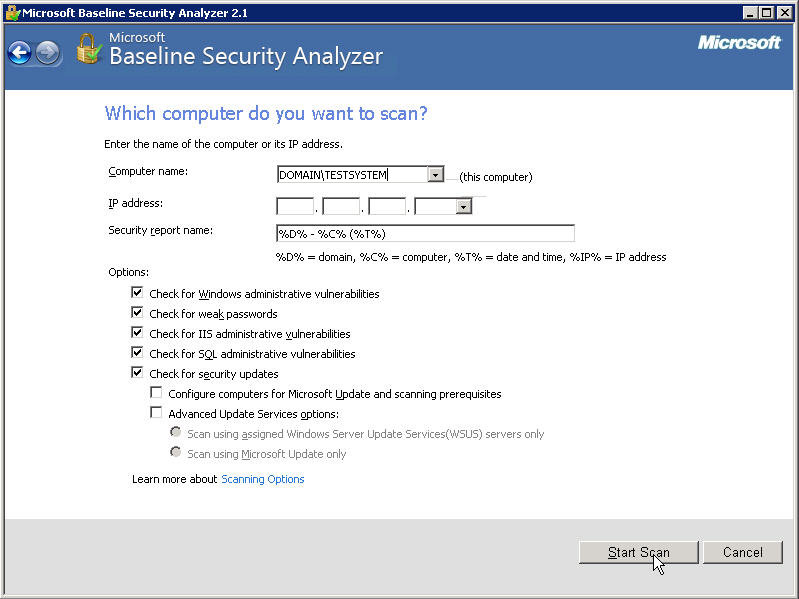
Microsoft Baseline Security Analyzer

Most every IT pro has heard of and (hopefully) tried MBSA at some point, but here's a reminder for those who haven't revisted it in a while, and a step by step how to for anyone new to this tool.

This is EASY to use and everyone should check their systems against this tool from time to time.

  1. Download the tool.
  2. Install it. (Double click the exe file you just downloaded.)
  3. Go to Start|All Programs|Microsoft Baseline Security Analyzer 2.1
  4. Choose if you want to scan one computer or multiple computers.
  5. Fill in what computer(s) you want to test (you must be administrator on them)
  6. Click Start Scan
  7. Sit back and drink your coffee.

Friday, May 28, 2010

Keeping Your Kids Safe Online

For parents looking for something to teach kids about online safety, there is
Zoe and Molly Online. It is a web comic and quiz designed to teach children about possible dangers online. It was created by the Canadian Centre for Child Protection, in partnership with Shaw Communications Inc. It's being introduced to kids at school all over the country.

If you find something online that exploits children report it here: http://www.cybertip.ca

Friday, May 21, 2010

Hotmail Gets More Secure

Following Google's lead, Microsoft has made the SSL/TLS secured http (https://) protocol the default for Hotmail.

In addition, Microsoft has started an attempt to make the users more aware of possible phishing attempts by marking the e-mails they have verified as coming from a legitimate source with a green shield icon.

Spam filtering finally gets personalized. You can now mark senders (who are not necessarily on your contact list) that you don't want to be sent to the junk mail folder.

And perhaps the most innovative feature, if you are away from home and accessing your e-mail from a public workstation (like a cyber-cafe or library) or simply on an unsecured wireless network and want to have the added assurance that your password will not be compromised, you can request a one-time password to be sent to your phone.

Tuesday, May 18, 2010

SecTor 2010

I registered before the Early Bird price expired again this year, and boy am I glad I did. Looking at the first round of speakers that have been announced... There are a few I'm really looking forward to, but none more than HD Moore's talk on Metasploit and penetration testing.

For those who don't know what that's all about, penetration testing is basically simulating a cyber attack. HD Moore Is one of the world's most recognized names in this field because he started the Metasploit Project to create an open framework of tools to do such testing.

This is the direction I'd like to take my career in. I'm really excited about a chance to meet HD.

Cyber Security In Canada?

A CSIS memo says risk of cyber attacks on the rise. (No surprise to me or anyone else in the computer security industry.)

Check out this video clip from CBC's The National

So far Canada doesn't have a comprehensive plan. By contrast, the USA is spending $40 billion on cyber security. Are we falling too far behind?
Public Safety Canada says that a national strategy is pending, I hope it's worth the wait.

Friday, May 07, 2010

The Very Real Dangers Of Photocopiers

In case you missed it, the internet's been all a-buzz about the dangers of photocopiers from a privacy and information data leakage point of view.

CBS did a great little 5 minute segment on this, here it is:


Watch CBS News Videos Online

Tuesday, May 04, 2010

How To Start using E-mail Encryption (Part 1)

I called this "Part 1" because there are a number of different ways to encrypt e-mail, and this is the one I use, but over time I will try to cover others.

Why encrypt? E-mail is sent in plain text. If you are careful, you connect to your ISP's mail server using SSL encrypted transports. (the https:// page of a webmail, or using the SSL versions of POP or IMAP as explained in my previous post about Gmail security). If you are lucky, your ISP might use SSL encrypted transports beween their server and the next server (still not common practice), but plain text versions sit on the disk at both servers, and eventually on the computer of your intended recipient. The recipient we are not worried about, but if it's not something you want the mail man reading you don't put it on the back of a post card, you stick it in an envelope. That's encryption. SSL trasport encryption is like those big yellow interoffice mail envelopes. All your stuff goes into one of those for transport across the office and is opened when it gets to the right department. PGP (Pretty Good Privacy) or GPG (Gnu Privacy Guard, the opensource version of PGP) is like mailing your letter in a lockbox that only your recipient has a key for.

So how do you set up GPG for personal use?
First, if you are still using Outlook Express as a mail client, switch to Thunderbird. No, really. Outlook Express is a bad mail client anyway, and the integration with PGP and GPG is dismal.

If you are using the full blown Outlook you must be using it for corporate use, just buy PGP it integrates seamlessly.

Now for those already using Thunderbird (or new converts from Outlook Express), download the appropriate version of  the Enigmail Add-on and GNUPG for your OS. (Gpg4win if you are on windows)

Install GPG. Install the Enigmail add-on into Thunderbird

When you have Enigmail installed you will see a couple of new menu items and icons at the top like this:


Then you need to create a GPG key, associate your key with your e-mail address in Thunderbird, and set the settings of when you want your key to be used for signing and encrypting. I recommend that you set it to encrypt automatically if the contact has a known encryption key.

Follow the instructions that came with your version of GPG for creating a new key. 

Associating a key with your e-mail address is pretty easy.
Open the account settings in Thunderbird (where you set your e-mail address), there is a new menu item there too.

If this is your first time ever using GPG/PGP then you can probably leave it set to use e-mail address to identify OpenPGP key. If you have old keys floating around or use multiple keys select the Use specific OpenPGP key option.

Select whether you want it to insist you sign messages or not.

Back to that OpenPGP menu item on the main window... Click it
Select Preferences.

The most important setting in this menu is this one:
When sending mail, Add my own key to the recipients list. If you don't select that you won't be able to read your own sent mail when you encrypt.
Next to that I'd say selecting the Encrypt replies to encrypted messages is a good one to check. If someone went to the trouble of securing communications with you, you don't want to reply to them in the clear.

Now when you go to write a message there is a new option icon at the top of that screen:


Now you just need some PGP public keys of friends to send encrypted mail to. Here's mine. Have fun, and stay out of trouble. :)

-----BEGIN PGP PUBLIC KEY BLOCK-----
Version: SKS 1.1.0

mQGiBEokPi0RBACEx42f/6jaMTyWSfi3165ew22znJ2lUc3hW635/uWw6kD12G3eWqe7Ph74
wMaUanH/pK0ReTHwkds7pMRU0+e+k9bX0xmwAmzVlmp8E2MpLJ9GN5c/Dl7y2wkP2b1LGszl
L51ub4KZfZUxZDDCuNu6kZoUw5rLo44XPc0wonP00wCgzkWraKCG/MVqTx7sfN4R1xoPDxUE
AIH7p3/n0smBGYqSSPxGEpzqzAmfKR4vnz38SEDlSqCtI4gv1OtW9/ujVXr4JdOD+cvPstPj
oeeluGsYDdsi/c3CVAf63sKCHoqEE8LmM2syvULA7RdkZ9bvtvyP1wtH25e/weHSUVWdX/ou
x/HG0P952O+tt95w0sYbuWWMKoQNA/4olQ6g/tT9D6hHUPfg3OZjTzIxbWreafg5ZcRoVsCy
sMyyQH7zWpzOvy1sZAg5KynvZFqmij4VBRulcieh6Yuz7lYO2XarpYlmoOa8JcbCNHIutkts
HT8DHSy18Kiq6RA1gqbT/3tmDsDfYNWEGX379GWM0l9f/3mtw2YQGFRcp7QnUm9kIE1hY1Bo
ZXJzb24gPHJvZEBtYWNwaGVyc29uY2xhbi5jb20+iGAEExECACAFAkokPi0CGwMGCwkIBwMC
BBUCCAMEFgIDAQIeAQIXgAAKCRClLPlKUhouNpKdAKCK9xZ/T0POQLJjn7/bjanGJIxmTgCg
rirVjRUGAOX+pe+X/KWvJwwxyoy5Ag0ESiQ+LRAIAMZcPrDRfiDkPLQPrDqPSBEbyQBBXqhU
5kwdFGyPTJzvluLz4NBvX8JsetQ95FTBQe5e03j+VKrzSPNglXtPYxKLbt6fpNJALF2lmPNU
Jm2ppp8PsFwUe1zPUZyf05OohHqpXper8Wpzp3C7fVFTC7Ii7hBPEyo7y/0RLd6u40X3a+5M
q/57QXAa8lqm006aG70ScDhtYvT6f8mKBWu+fgD7G5EMT8ICcO78qXLMtWv0R48UPXoqM4GM
TrVhlZSwGY5HvY/L8RtUI9irZMH2LoreXRbTaWwYzapJsw3C6oHyeb9hpCbbnwdbrKnRmeMY
VqdED2eYOY6VIJ6/vLD4QF8ABAsIAIdQWUOfNY/x7+ZDDdat62dyabzlNFk6YN444WQ+8Qno
9346gxtp4BMH8O0UksYkXl5KeCiMofMTQlZFCSdfTs5QK6NbkT5Yes/mchAJy5749zvGdVnJ
HZD6cIaCwYaf4nKbyZP4qyJK7hdBvMeNfaPI131OPtmA8DHxnb8pjPYbdTRbJ0/++iP4HcQU
sAvIY9+WXDHUMjDolfa4GtEemsudM+sBGrz5Sv4Jm3vvXazcDO4ehgIflXvF4w32OEYk+3Y5
VuSY4qBbRZlaAwdzlUcr4XMdW0518HJw9U9l+33C0D3o9klt7NzSAeLvloDdEmY1A1xd31Ue
7KuGEP2InEOISQQYEQIACQUCSiQ+LQIbDAAKCRClLPlKUhouNnfiAKCx0e8IUsBXCGDp5/Za
ZUathieLqgCaAz1aqmbfvvDM5jYDOhlW038OHJc=
=E1F/
-----END PGP PUBLIC KEY BLOCK-----

Sunday, May 02, 2010

Why Keep Passwords To Yourself?

This video I found online will help explain it.

HACKING IS EASY! from Airwave Ranger on Vimeo.

Tuesday, April 27, 2010

Certified Ethical Hacker?

Yes, there is such a thing.

Although, I'd say that it certifies neither that you are a hacker, nor that you are ethical.... but it does show that you have been exposed to a wide variety of tools that hackers might use to invade your network, so that you will recognize them if you ever come across them, and you will be able to use them to test your own defenses.
("testing" someone elses defenses without written approval is illegal!)

I strongly recommend that, as a minimum, every network security professional should have this certificate.  It took me very little time, most of which was spent finding and playing with some of the programs, and very little money (less than $300 including the test and the review guide) to get this, and, while it is not the most prestigious certification on the planet (My CISSP is something I prize far more), preparing for it was a good review of all the "hacker tools" I'd read about in the past 10 years, and reminded me of some tools for network administration that I'd neglected that have made life much easier (like Microsoft's PSTools)
Update: April 29, 2010

So what does an Ethical Hacker do?
An Ethical Hacker tests a corporation's network defenses under contract by that corporation to identify weaknesses in the company's information security, so that the company can fix the problems before a malicious hacker (or cracker) finds and takes advantage of that weakness.

Why would a compnay need to hire an Ethical Hacker?
They don't want to be the next TJX. Some government regulations require companies in certain industries to have Penetration Testing (simulated hacking) done on a regular basis. The Payment Card Industry Data Security Standard (PCI-DSS) requires larger companies to have at least regular vulnerability assessments done. Ethical Hackers can help with some of these goals.

Why did I get certified?
I want to take the EC-Council Certified Security Administrator (ECSA) course later this year, and probably then become a Licensed Penetration Tester (LPT). To do that I needed to first get the CEH certificate.


Thursday, February 11, 2010

Microsoft End Of Support Coming Up Soon For Some Versions Of Windows

After April 13, 2010, Microsoft will no longer issue security updates for Vista RTM (release to manufacturing).  Vista users are encouraged to upgrade to Vista Service Pack 1 or Service Pack 2 if they have not already.

I'd personally recommend SP2.

After July 13, 2010, Microsoft will no longer support Windows 2000 at all, and will no longer issue security updates for Windows XP SP2.  If you are still running Windows XP SP2 upgrade to SP3, or Windows 7.

Wednesday, January 20, 2010

The "Aurora" Attack That Got Google And Adobe

This is why you MUST get off IE6 and onto an up to date version, and KEEP it up to date, and run an up to date Antivirus.

I'm sorry, this is really technical, but it is important. 


YouTube video courtesy of Sophos Antivirus.

Thursday, January 14, 2010

Gmail Now Secured By Default

Google has decided to make the SSL encrypted sessions in Gmail on by default now!
I talked about this little known option back in September. You no longer have to go into the settings to turn it on, it's on by default now. Yay Google!

Now if only Hotmail, and Yahoo mail would follow the lead.

[UPDATE: May 2010]
Hotmail has followed suit! now Yahoo where's your update???

Tuesday, January 12, 2010

Why Isn't Apple Giving Us A Patch? (Again!)

Why does Apple sit on bugs that have already been fixed by others for so long?
http://mobile.darkreading.com/9287/show/f4a5b8931d4d475c18ae22de0f497db3&t=dafc4b74d510e5f9ebf32b0d1a1a7475

Remember the Java one that hit the news back in May? At least you could get your Java elsewhere.

Sunday, December 27, 2009

SmartSwipe (and HomeATM)- A Very Smart Tool For The Cautious Online Shopper

I hadn't heard of this device until I was leafing through the Hammacher Schlemmer catalog tonight and the claim of a credit card reader that you plug in to your USB port that will read your credit card and encrypt the card info, and insert it into the browser, pre-encrypted, to be securely transmitted to any online store without ever passing the unencrypted data to the user's computer caught my attention.

The device is the SmartSwipe by Canadian company NetSecure.

I had a hard time believing that what the catalog was claiming was possible, but then after reading the white-paper on it at the SmartSwipe site I think it's incredibly smart. With this device installed, it's driver is used by the web browser as an encryption engine. The browser (for now it only works with IE) passes off the unencrypted form to the device, which inserts the creditcard data into the form an encrypts the page before passing it back to the browser to transmit to the store website. The device does the encryption, not the browser, so since the card scanning and encryption are done outside the computer, there is no unencrypted data for spyware running on the user's PC to read.

Normally, if you typed it in yourself, there are a number of places where spyware or keyloggers could grab the unencrypted data before the browser gets a chance to encrypt it to pass it securely over the net to the store.

This way the spyware would have to be running on the card reader (which for now anyway, isn't an issue, no one has written spyware that runs in the external card reader) so, it is safe from all the current spyware until it gets to the store's end of the chain.

These are very nice, and I hope that they manage to work deals with the major manufacturers to install these, or better yet, a next generation chip and pin version directly into new PCs.

The SmartSwipe is probably not the only such device out there, the technology to look for if you find another device like it is called Dynamic SSL. I believe Dynamic SSL is the future for secure online shopping. 

For a little company from Saskatchewan, they certainly have made inroads with this device being carried by Costco, Futureshop, Dell and Amazon already, and it only works with 32 bit Internet Explorer so far. Once it works with other browsers it'll probably become a commonplace tool for regular internet shoppers.

[Ed note: Only a few hours after the initial post which mentioned only SmartSwipe, a sales person from Home ATM posted a comment. Therefore I have changed the title to reflect that. Having read the website at http://www.homeatm.net I cannot say for sure how the HomeATM works, but I am really disappointed in the video demo that they use to show how secure it is. The fault in the video isn't really with the device itself, but the method that Western Union used to send the money that was taken from his account to the recipient.

Sure, it was securely transferred from his account to Western Union, but then Western Union sent an unencrypted e-mail to a Gmail account with a web link and all the details including a password needed to retrieve the funds. Anyone who could intercept that e-mail could take the money before it got to the recipient. Sure, then it is securely transferred to the hacker's account from Western Union, but the intended recipient is left with nothing.

It is not the device's fault how Western Union chose to implement the transfer, what W.U. should have done was what the Canadian banks on the Interac system do and have the user create a password that they tell the recipient OUT OF BAND so that an intercepted e-mail transfer is still secured by a password that is not known to the intercepting bad guy. It is a poor marketing choice to use a video of a system with such an obvious security problem to demonstrate a security device.

The biggest problem I see with the device itself, aside from being a magstripe and PIN device as opposed to Chip and PIN (which I'm sure will be the next version) is that there doesn't seem to be any way to actually get one.]

Friday, December 18, 2009

New Adobe Reader Vunerability

Adobe Acrobat has another newly discovered 0 day vulnerability.

As usual the fix is to disable JavaScript in Acrobat Reader. Adobe won't have a patch out till Jan 12.
If you have to do it network wide follow the instructions from this post I did back in October to do it via logon scripts.

Upgrade to 9.2 even though it is technically vulnerable, if you turn off JavaScript (which you should do even after the patch is out) 9.2 will let you enable JavaScript on a document by document basis as needed. (usually it is NOT necessary)

Monday, December 14, 2009

Xmas Gifts For Techies 2009

Ok, it's already Dec 14, you only have 10 days of Xmas shopping left. If you haven't already got a big gift for your resident techie, here are a few ideas:

1. PS3 slim. One of the first posts on this blog back in 2006 was the PS3 line watch. Back then I was drooling with anticipation of the upcoming PS3. I bought one in the summer of 2007 because I was stuck at home all day for a few months because of a car accident. ...even back then with hardly any games available it was fun. The new slim version is out now for this Xmas season. It doesn't play PS2 games anymore, and only plays PS1 games if you download them from the online store (about $6 each) but there are lots of PS3 games and bluray movies out now so that's not much of an issue, and if it is, you can always pick up a PS2 slim to go with it for peanuts.

2. Drobo. Every techie needs more disk space... constantly. Drobo will manage it all by itself. You just stick a disk in, when you need more space you stick in another disk, when you need more, stick in another. when you run out of slots to stick disks into you pull out the smallest disk and stick a bigger one in in it's place. No config, no copying files around, it takes care of it all for you.

3. ReadyNAS. For the techie that has more stringent requirements for his/her data storage, ReadyNAS is like Drobo on steroids.

4.Amazon's Kindle e-book reader. For a geek or a book lover (or a geeky book lover) this is a great gift idea. It stores and displays (in black and white) books and magazines bought through Amazon or downloaded as PDF. It has a rechargeable battery, but it only needs to be charged about once a week, even when the wireless is left on all the time. You can go much longer than that if you remember to turn off the wireless connection when you aren't actually downloading a new book.

Network Vulnerability Scanners

Back in September I mentioned that GFI LanGuard was available for free for small companies or home use where you only needed to scan 5 PCs.

One other option that has come up since then is the new much easier to use web-based Nessus 4.2.

Nessus has always been free for home users, but now I feel that it's easy enough for most home users to set up. It comes in a windows version, and there is only the server end to set up now, everything else is done through a browser.

Unfortunately the Pro version of Nessus is a little pricey for the average small business at $1200 per year, but you can hire a pro, like me, to come in and scan your network on a regular basis with this tool for probably a fair bit less than that. (pro licenses are not tied to a physical network, but limited to one machine... so if that machine is a laptop, a pro feed license can go wherever the security contractor takes it.)

Rapid 7 has also recently released NeXpose Community Edition, which I have yet to try out, but is free to use for a network of up to 32 PCs, and there is the open source OpenVAS, which was spun off from Nessus back at version 2, when Nessus was still an open source project. These 2 options I suspect would be more difficult to get up and running than the first two, as they are really aimed at folks with a high level of tech knowledge. NeXpose comes in several other versions for varying levels of additional features, and larger networks, but it is more expensive than the Nessus Pro feed, so very much out of the reach of the average small business or home user, but the Community edition is supposed to be very good, and I'll be playing around with it in the next few weeks and I will let you all know what I think.

No matter which you choose, scanning your network, especially for business networks, is an important part of keeping your network secure. If you don't scan it to find the holes in your security, someone else will, and they probably won't point out the holes to you, they'll probably just use those holes in ways you don't want them to.

One other option, from the folks at Rapid 7 is the free online scan. You can scan 2 IP addresses for free from the internet at http://www.rapid7.com/freescan.jsp This should give you an idea of how exposed your servers that are attached to the internet are. This will only scan public Internet IP addresses. It is probably best to get a local scanner set up or hire a pro to come in and scan the private address space as well, especially if you use wireless.

Friday, December 11, 2009

Making E-mail Private

Ok, hopefully some folks read and made use of my previous post on using SSL in Gmail.
If you didn't and you use Gmail, go read it now. It only takes about 10 minutes to read and another 10 minutes to implement.

Now, I have to wonder why is it that people never seem to care enough about privacy to encrypt e-mails?

Sure, for some it's a matter of not knowing you CAN encrypt, for others it's a not knowing HOW to do it... but it seems the biggest thing is an aversion to using passwords.

I have a 30 character password that I type in whenever I want to encrypt or digitally sign an e-mail. Most people would not go to such an extreme, but even a 6 or 8 character password with PGP or GnuPG that you only had to type once per mail session, when you first open your mail program or when you send the first message that day, would afford a lot more privacy and ensure that mail you think is from friend X isn't really from stranger Y pretending to be friend X.

How many people have had an e-mail come to them apparently from a friend that turned out to be spam, or worse, a virus? ...or even a roommate playing a practical joke on the supposed sender? PGP/GPG would solve that. I've been using this technology on an off (and recently more and more) for years, but surprisingly few others I know use it. I could understand if it were like S/MIME encryption that requires a yearly fee for a certificate, but PGP is free. All it takes is a little bit of effort to get started then you can stop sending love letters and secret passwords and Grandma's secret family recipes on the electronic equivalent of postcards and start mailing things in e-envelopes. (strong e-envelopes).


If anyone reading this is thinking "hey, I should do that, but it's too hard" e-mail me and I'll help you get started. ...just don't get discouraged if Microsoft and I are the only ones who even send you signed e-mails for a while. It's something that will take time to catch on amongst your friends, and that many people won't ever bother with....some folks will always think that secret codes are only for spies and criminals, but if you don't try to protect your privacy, who will?

Rod MacPherson
rod@macphersonclan.com
My PGP key

"Spacebook" Security Lessons In The Form Of A Comic

From http://www.gocomics.com/stonesoup/2009/12/09/


Friday, October 23, 2009

Upgrading From An Old BlackBerry?


If you have a blackberry and you have your personal e-mail forwarded to it (not your corporate mail) when you upgrade it, send it in for replacement, or even just toss it away, you MUST remember to log in to the BIS server at bell.blackberry.net or telus.blackberry.net or rogers.blackberry.net ...  depending on who your phone company is, or just through the mail setup icon on the blackberry device, and disable the forwarding. This does not happen automatically when you cancel your phone plan or move it to a new phone.

The corporate mail is different, it comes through a corporate BES server hosted at your company, and they can easily shut off the forwarding of any info to the blackberry device, but BIS used for personal e-mail is managed via the blackberry.net servers and linked to an account that only you know the password to. It collects the mail and forwards it to the device you specified by PIN #, which is attached to the device, NOT your account!

If that device is reused by another user with another phone #, the BIS server will still send your mail to the device until you log in and tell it not to.

That is just one more reason I dislike the BIS setup rather than letting the blackberry connect directly to the POP/IMAP server for personal e-mails. #1 I don't like that I have to trust RIM and their partners with my personal account passwords, and #2 wiping the blackberry and cancelling the phone plan isn't enough to ensure that the next guy doesn't get free access to my mail. I also have to either log in to the BIS and cancel forwarding, or change my e-mail password.

This is also why I discourage the use of PIN messaging except as an alternate, emergency communication channel if normal e-mail is down.

People still think of PIN as being more private than e-mail, but it is not. It can be, and often is, logged at one or both end's corporate servers, but if your contacts have an old PIN# in their address books and they try to PIN you a message, but somone else owns that Blackberry device now, guess who gets the message!


Wednesday, October 21, 2009

Tips Of The Day

If you have a Google Reader account or use an RSS reader here is a link you ought to be following:
http://feeds2.feedburner.com/security-awareness-tip-of-the-day

Wednesday, October 14, 2009

Adobe Virus Update

Users can undo the change, as it is in the Current User part of the registry, but here are the lines to add to the login script.
reg add "HKCU\Software\Adobe\Adobe Acrobat\9.0\JSPrefs" /v bEnableJS /t REG_DWORD /d 0 /f
reg add "HKCU\Software\Adobe\Acrobat Reader\9.0\JSPrefs" /v bEnableJS /t REG_DWORD /d 0 /f

You need both lines to get Adobe Reader and full Acrobat Reader/Writer.
The new Reader 9.2 gives the users a better warning saying that it can be potentially hazardous to turn it on and allows them to choose to turn it on "for this document" or permanently. (until they log in again and the script shuts it off again.)


Friday, October 09, 2009

More Adobe PDF Viruses On The Loose Patch On The Way

"You can get viruses from a PDF?" you say??
YES you CAN!!! and Seth Hardy of Symantec's MessageLabs just did a talk the other day at SecTor 2009 about how he's been able to (in a test lab) create a virus, embed it in a PDF and get past every known antivirus. This is scary stuff folks, and there is one little thing you can do to stop most of it.

HelpNet Security says that a new round of these viruses is out in the wild and Acrobat 9.1.3 is vulnerable, but a patch is coming on Oct. 13th. In the meantime they recommend turning off Javascript.

Open up Adobe Reader/Acrobat and turn off JavaScript! Yes, PDFs can have Javascript, though you've probably never even seen a PDF file that legitimately uses Javascript.

Here is how you do it in Reader 9.1.x :
Click on the Edit menu, click Preferences.

Select Javascript from the Categories menu.
Click the checkbox OFF next to Enable Acrobat JavaScript

Saturday, October 03, 2009

Loading CD-ROMs On A Netbook

OK, everyone knows that the biggest fall back of a netbook is it's lack of CD-ROM/DVD-ROM drive.
Most people know you can get a USB CD-ROM drive and fix that.
A few know about CD-ROM emulators like the one included with Alcohol 120%... but that has an extra cost.

After a little browsing around the net I found a FREE CD-ROM emulator from Microsoft!

Download the Microsoft Virtual CD-ROM Control Panel package now.

Thursday, October 01, 2009

OWASP top 10

This is a little higher level then what I normally post here, but this is info that every IT guy ought to know about so I feel I should pass this stuff on. October, being Cyber Security Awareness Month, will probably see more than the usual rate of security related posts here, and some may be aimed at IT people, others will be aimed at home users and small business owners.

OWASP Top 10 Security Vulnerabilities Part 1 (Barry Dorrans) from Edge UG on Vimeo.


OWASP Top 10 Security Vulnerabilities Part 2 (Barry Dorrans) from Edge UG on Vimeo.

Friday, September 04, 2009

Gmail Security

There are a few things you really should do if you use Gmail that will make it more secure (and more convenient).


First, log in and then click the Settings tab as shown.


Now scroll down to the bottom and check the "Always use https" option.
This will help keep people from spying on you at public WiFi stations like McDonalds, Starbucks, or the library.


Now for the more convenient part...
You can actually check Gmail in your own e-mail program! You don't need to log into the website, or to download some special Gmail only software to get the "you have mail" pop-up.

Click on the "Forwarding and POP/IMAP" link.


Down at the bottom, again you will find the "Enable IMAP" option. Turn that on.
Then follow the instructions in the Configuration instructions shown as step 2 in the image.
make sure you always select SSL as the connection method. (on port 993)

DO NOT cheat and select the gmail option in Thunderbird if that is your mail client. That will set you up with unencrypted POP mail. Trust me you want SSL encrypted IMAP. In fact, no matter who you are getting your e-mail from, you want SSL, or better yet, TLS encrypted IMAP. POP is so 1994. (and if you run it unencrypted you are enabling "Big Brother"...so maybe I should have said it's so 1984.)

PCI DSS

If you don't know what PCI-DSS is and you run a business that takes credit cards you need to read this:
Click for a free PDF copy

The Payment Card Industry (PCI) Data Security Standard (DSS) is something you have already agreed to, and MUST follow. Does your bill for your merchant account include a line about non-compliance fees? This is what it's about.


GFI LanGuard


There are all kinds of different network vulnerability scanners out there, but the best bet for small businesses is probably GFI Languard.

The reason? It's simple and it's free.

It is an easy to use Windows based program, so no need to learn or install Linux to use it.
It is absolutely free if you have 5 or fewer IP addresses (computers) to scan.
It is free for a 30day trial if you have more than 5 IPs to scan.

Wednesday, September 02, 2009

VirusTotal

VirusTotal is a free service that lets you check a suspicious file against 35 different Antivirus tools.
If you get an e-mail attachment that you really are not sure about, and your own AV doesn't see a problem, you can check it here and know with some certainty that at least no other AV vendor sees the problem.

Monday, August 31, 2009

Secunia - Keep ALL Your Software Up To Date

You have Windows Automatic Update to keep windows itself up to date, and if you remembered to opt in to it maybe you've even upgraded it to Microsoft Update to keep your Office programs up to date too. ...and some software like Firefox and Java have their own updaters, if you didn't disable them to keep your performance up...

But what about all the other programs you run? do you know you are upto date?
Secunia will tell you.

You can go to their web portal for a free scan of your system any time you like, and it will check it all for you. If you are using it at home you can download Secunia PSI (Personal Software Inspector) or if it is for business use there is the cooler sounding Secunia CSI (Corporate...) at a cost, but well worth it.

Wednesday, August 26, 2009

SecTor 2009 - Last week for discount pricing


SecTor (Toronto's big InfoSec conference) admission prices go up on Sept 1.
If you haven't got your tickets yet now is the time.

After Sept. 1 it'll cost $250 more to get in to this great IT security conference.

If you are a member of TASK or OWASP You can get an additional 10% off, just look through those mailing lists, there have been discount codes posted.

There are some great speakers booked for this year. I'm really looking forward to it.

Tuesday, August 11, 2009

Canadian pricing for Windows 7 family pack

Windows 7 will be available in a "Family pack" 3 pack of licenses for $200 ($67 each license) for home users wanting to upgrade from XP to Win7 Home Premium.


Read more at Digital Home.

Thursday, June 25, 2009

Certified


I recently (June 23, 2009) became certified as a CISSP® by (ISC)2.

Wednesday, June 10, 2009

BlackBerries and E-Mail

Why is it after all these years in the messaging business BlackBerries cannot handle E-mail as well as my old Pocket PC or Zaurus handhelds did? Sure they weren't cellular, but they could handle POP and IMAP over wired or wireless 802.11 connections without help. Even encrypted IMAP wasn't a problem.

Yes I can access my IMAP account from my Blackberry, but it has to use an intermediary server hosted by RIM which means that I have to enter my e-mail credentials for my private personal account into RIM's server so that it can check my IMAP mail and relay it to my Blackberry. Why doesn't my Blackberry come with an IMAP capable e-mail client?

The way they are doing it now has several problems.
#1 I have to give RIM my account info instead of just inputting it into a device that would normally be on my person.
#2 I can't access anything but the inbox. None of the other folders are available via this 2 stage e-mail retrieval process.
#3 (ok this is more a complaint about the OTHER type of e-mail BlackBerries do....) My BES e-mail from work doesn't get it's own icon like the BIS ones do so while I can look at each of my personal mail accounts individually, when I want to read my work e-mails it's all mixed up with the e-mails from my home accounts.

If I could have encrypted IMAP done on a 400 Mhz ARM processor 8 years ago, why can't my BB Storm do it?

Friday, May 22, 2009

Why isn't Apple giving us a patch?

Why isn't Apple giving us a patch for the java bug that Sun fixed 5 months ago?
SANS Internet Storm Center doesn't know either.
http://isc.sans.org/diary.html?storyid=6442&rss

Wednesday, May 20, 2009

Klingons need antivirus too.

http://www.sophos.com/klingon/

You think you're immune just because you run MacOS or Linux, but not even the Klingons can keep today's malware at bay without a little help.

Wednesday, April 29, 2009

SecTor 2009 - Early bird registration ends tomorrow

Hurry up and register before May 1 or the price goes up.
SecTor (short for Secure Toronto, I believe) is a conference for Information Security folks in Toronto, Ontario, Canada.

It is Oct. 6 & 7 this year, with training courses on the 5th for those who desire a bit of heavy duty security training before the conference. The training on the 5th is in any one of these topics:

Session Title Presenter Cost Link
Securing your Microsoft Infrastructure Brian Bourne
CMS Consutlting Inc.
$999 Register
Understanding Web Application Attacks Security Compass $999 Register
Auditing systems and networks with Backtrack 4 The Academy $999 Register
Data Forensics – Essentials for Survival Robb Beggs,
Digital Defence
Larry Gagnon,
Forensicom
$999 Register


Currently you can get admission to the 2 day conference for only $499 After May 1st it goes up to $749. ...and for the really tardy, tickets will be available at $999 after Sept. 1st. (if there are still tickets to be had)

(Hint: TASK [Toronto Area Security Klatch] has a 10% off coupon to reduce that price even further, but I 'm not going to tell you what it is, if you really want it you can find out for yourself.)


SecTor 2009 Tickets are Limited!
CLICK HERE TO REGISTER NOW

Sunday, April 26, 2009

Big news for fans of Windows.

Rafael Rivera and Paul Thurrott reveal a new Windows 7 application compatibility feature called Windows XP Mode here.

Basically, any owner of a copy of Windows 7 Professional, Enterprise or Ultimate (which covers just about everyone who will be using it in a corporate environment, and a lot of home users). will be entitled to download what is essentially a copy of Windows XP in a virtual machine that will run in parallel with Windows 7, seamlessly integrating it's windows and icons with the host Windows 7 ones, thereby relieving Microsoft of the need to keep old code in Windows 7 and future versions for compatiblity with old software. If it won't run in windows 7 you install it as an XP compatibility install and it runs in XP on top of Windows 7.

Tuesday, April 14, 2009

Microsoft prepping IE8 auto update

Microsoft is preparing to roll out IE8 to IE6 and IE7 users via autoupdate "on or about the third week of April".

IE8 will be available to WSUS in July 2009.

Visit the Microsoft IE blog for more info.

Sunday, April 12, 2009

Twitter hit by a worm on Saturday

A worm infected Twitter on Saturday April 11, 2009.

The worm seems to have originated at the StalkDaily.com site, as it seems that it's main purpose is to direct people there. Twitter warned people against visiting the site or linking to it.

The worm sends spam tweets from the infected person's account that direct others to the StalkDaily site. Simply visiting the profile page of an infected user can lead to one's own profile getting infected.

If you have been locked out of your twitter account due to this worm, you need to do a password reset as Twitter has locked some infected accounts.

Twitter claims to have now fixed the security hole that enabled this worm, and that no passwords, phone numbers, or other sensitive information were compromised as part of this attack.

Ubuntu 9.04 ...just around the corner


Also, Ubuntu 7.10 reaches end-of-life on April 18, 2009

Saturday, March 28, 2009

Ubuntu 9.04 Beta ... and cloud computing

The Beta version of Ubuntu Linux 9.04 is out.
I don't recommend the beta release for anything you want to keep working and stable, but if you want to run the liveCD and get a preview of what's coming at the end of April it's here.

9.04 promises faster boot up and support for the new Linux file system ext4. It also provides the really ambitious folks the tools to build a cloud computing server system.

This may be an interesting year for Linux. Cloud computing is hot and with all the little mini laptops on the market (perfect clients for cloud computing clusters) I imagine it'll get hotter. Ubuntu is packaging the tools for the server guys to use into it's system... It's only a matter of time I think before cloud services start popping up in large numbers.

Thursday, March 19, 2009

Internet Explorer 8

For those of you who haven't upgraded to IE 7 yet, now you are another version behind. Microsoft officially took IE 8 out of beta.

The most touted feature seems to be InPrivate Browsing, which lets you browse the web without saving your history. A number of other new features are added in IE8 though, so check it out. IE 8 is also supposed to be better at identifying and blocking malware sites. That alone is worth the download.

Tuesday, March 10, 2009

Need to Budget?

If you find yourself needing to tighten down your spending in this economy Intuit has a free helper for you. Quicken Online.

Thursday, February 26, 2009

Improving Your Mac's Firewall

The Mac comes with a firewall built-in, but like the Windows built-in firewall,
it is very limited in it's capabilities.

NoobProof and WaterRoof are both free (open source) firewall front-ends from hanynet.com that improve the flexibility of the Mac's built-in IPFW firewall.

WaterRoof is a very complex and powerful tool, which allows you to configure almost every aspect and option of "ipfw". And more, you can list/manage active connections or network files, do graphics log analisys, configure your mac as a router with bandwidth management with stateful rules and tons of other options. You need a good knowledge of "what a firewall is", and you should also have at least a basic ipfw knowledge.

NoobProof is a very easy tool. When you start it the first time you have a service list and you can choose to "allow" or "deny" connections to those services. So you have only to decide which service to allow, and then check "Activate NoobProof". You can also add selective "allow" and "deny", and you can delete or add new custom services in service list.

COMPARISON TABLE WaterRoof NoobProof
Static rules list x x
Customizable dynamic service list
x
Customizable rules builder x
Startup Script and Startup configuration x x
Import and export firewall configuration x
Bandwidth Management (Dummynet) x
NAT setup (Network Address Translation) x
Dynamic rules (stateful firewall) x
Ready rule sets x
Logs listing x x
Logs parsing and graphic statistics x
Network connections and applications list x
Network connections selective block or limit x
Appfirewall debug and logs listing x
Interface list and DNS/WHOIS queries x
Configuration Wizard x

Wednesday, February 25, 2009

Windows 7...It's better than Vista. Promise.

Tech Republic posted a PDF today, "10 Reasons Vista Haters Will Love Windows 7"
Trust me, from what I've seen it is better than Vista.

http://i.i.com.com/cnwk.1d/i/tr/downloads/home/dl_10_vista_haters.pdf

Tuesday, February 24, 2009

Tuesday, January 27, 2009

IE8 RC1 released today

Internet Explorer 8, Release Candidate 1 (the first beta actually being considered for release) was released today.

You can get it here: http://www.microsoft.com/windows/internet-explorer/beta/

This follow up to previous versions of IE that I'm sure everyone is familiar with adds private browsing (with no history recorded for private sessions) and improved security features.
It also allows you to simulate earlier versions for websites that insist on a specific version.


And while you are at it, if you have a spare machine just laying around, or if you are geeky enough to use a virtual machine (like me) download Windows 7 beta too.
http://www.microsoft.com/windows/windows-7/beta-download.aspx

It's like an improved, faster Vista. But make sure you have the minimum system requirements and that you have no problem with the computer just stopping when the Windows beta expires on Aug 1.

Saturday, January 24, 2009

Mac trojan - Beware of pirate iLife 09

A MacOS trojan infects over 20,000 systems who's users downloaded iLife 09 from pirate bittorrent sites. http://bit.ly/L4EP

Thursday, January 15, 2009

NOT the end of Nortel

There's a lot of talk about Nortel right now, but to give you all a little cozier feeling about it, just let me say "this is not the end of Nortel".

They have only applied for creditor protection. They are not closing shop, just re-organizing.
The new Nortel may be a slimmer Nortel after this, but I strongly believe that we will still have Nortel around for many years to come.

They say they will still be doing R&D. As much as they have been? Who knows? Time will tell.

They will still sell products. Will they eliminate some products? Will they sell off some lines of products to other companies just as they bought up product lines like Bay Networks switches? Maybe.


The CEO released a statement and video here: http://www.nortel.com/corporate/restructuring.html
...and they have an investor's FAQ here: http://www.nortel.com/corporate/collateral/investor_faq.pdf

Friday, October 24, 2008

Monday, October 20, 2008

Firefox 3 and colours (colors for the americans)

FF3 supports color profiles so that your photos will look the same in FF3 as they did in photoshop, but you have to manually turn it on.

Go to http://www.color.org/version4html.xalter to see the ICC profile test.
If the sky in the photo is half green your profiles aren't enabled.

Go to about:config and set gfx.color_management.enabled to True.
Restart Firefox.

Then go back to http://www.color.org/version4html.xalter and see if it changes.

Tuesday, August 12, 2008

E-bike blog

I have started a new blog on my own server for any further e-bike reltated posts.
If you are interested in following my e-bike adventures this is the place to look: http://www.macphersonclan.com/rod/ebike/wordpress

I won't post any more e-bike stuff here unless it is interesting from a tech point of view.

Thursday, August 07, 2008

E-bike Fall Ride

The Durham E-bike association is running a fall ride in Oshawa on Sept. 27th to promote the use of e-bikes as an alternate form of transportation. Mayor Gray will be riding along with the club from City Hall down to the lake.

Poster for Durham E-bike Association's Fall Ride

Monday, July 28, 2008

E-bike

After a bit of deliberation, I've decided to get myself an e-bike.

In particular, I have placed an order for a Veloteq Commuter RSV-GT in blue and black.
Which looks something like this:
My E-Bike, a 2008 Veloteq Commuter RSV-GT


I also paid my $25 to join the Durham E-bike Association. I believe that e-bikes are a fun, safe, and environmentally responsible form of transportation that should be encouraged, especially in the smoggier cities.

For anyone who's wondering what an e-bike is, Ontario is running a pilot (since Oct. 2006) allowing electric motor assisted bicycles on the road to be treated as bicycles (rather than motorcycles, like a moped) ...most other provinces and stattes already treat e-bikes as bicycles. That means no license, no plates, and no insurance needed... just a helmet. The catch is they are speed limited to 32km/h. ....which is faster than an average person bikes, but not faster than the road racers. The Ontario pilot program runs out in Oct 2009, after which they will still be road legal, but they may decide a license is needed, or that a few new rules are needed.

They come in both bicycle shape and motor scooter shape (like above).

I think it is a viable second vehicle that can be fun, is really cost efficient (pennies per charge), and easy to park.

They come with anti-theft alarms and locks, so that's not too big an issue.

For info on the e-bike pilot, visit the MTO E-bike FAQ.

Thursday, April 24, 2008

System info for Windows

I've played around with a number of utilities for windows that tell you more about what's inside your machine and this is the one I like best.

System Information for Windows. By Gabriel Topala


For those who use macintosh computers it will look exactly like what you would expect from something with the name System Information... just like the MacOS control panel of the same name.

The best part is it doesn't need to install, so you can put it on a USB key, CD-ROM, or floppy disk (does anyone still use those?) and carry it with you from one PC to another.

An example of the kind of useful info you can get with it is just click on Memory on the left and it tells you how many slots you have in total, and what's in each one (memory type, speed, even brand!)

Monday, April 14, 2008

Moving songs from iPod back onto computer

Imagine this situation:
You computer dies. You don't have a backup of your iTunes folder because you thought you had a back up in your iPod, but when you connect your iPod it only offers to copy back the files that you bought from iTunes. ...what about the 300 CDs you ripped? music you downloaded? podcasts? etc...

Hopefully you didn't say yes when iTunes said 'the iPod is synced with another computer can I wipe it and sync with this computer?'. You can get all that back, it's just not all that obvious. Set up iTunes to allow the iPod to connect for drive access (if it isn't already showing up as a drive)

There is a hidden folder called iPod_Control with all your MP3 files in it, but the files have been re-named to a numbering scheme that helps the iPod keep track of them, but makes it completely non-obvious which file is what to the user who manages to get in this far.

The fortunate thing is iTunes will be able to figure it out.
If you aren't already letting iTunes manage your music you might as well now, but if you'd prefer to have them back with sensible names so you can use another program it's just going to take a few extra steps.

To get these files into iTunes, just copy the lot of them to the hard disk, and open them in iTunes. If you have iTunes manage your music and it's set to automatically import then you are basically done. You just delete them again. iTunes will have already made a copy into it's managed directory. (which you should back up to make this even easier next time).

If you don't have iTunes manage them, then point iTunes to this directory and let it index them all. Now that they show up in the iTunes listing, drag them each from iTunes to a new folder. iTunes will automatically give them each a logical, human readable filename. When you are done you can blow away the random number named versions.

Now that iTunes has your music again you can re-sync your ipod.

Wednesday, April 09, 2008

Hard drive killer (literally)

On Tues April 8 I went to the IT360 conference in Toronto. There I saw a very cool harddrive destroying machine for those who want to make absolute sure that the stuff that was on their old drives doesn't get into someone else's hands.


Here are a couple of pictures of an ordinary Maxtor drive pulled from someone's dell desktop.

There is no way anyone is getting anything off that drive now unless they are VERY rich, and VERY talented.

The machine that did that can be bought or rented from http://www.vernontech.com

Wednesday, January 16, 2008

Nessus Security Scanner

If you don't mind seeing something that will make you feel a little paranoid, download the Nessus network security scanner.

It is a free tool (used to be open source, but version 3 is closed source but free to download and use because the creators didn't like other people re-branding and selling their work). It installs on Windows, Linux, MacOS, FreeBSD, or Solaris, and it is an easy way to find any known security holes in the machines on your network.

You can download it and install it on a machine in your network. You can install the scanning server portion separate from the client interface, so you can have scanners all over a large network and manage them all from your desktop.

Start it up, and run a scan with mainly the default settings (except turn off the DOS attack scan).

In any well managed network running a scan like this is going to set off a bunch of alarms, and it will probably make your printers print some gibberish, but hackers (smart ones anyway) don't use Nessus like this, they use their own tools, and know how to do it in a less noticeable way.

This scan will generate a nice report telling you all about at the numerous holes you have in your security. Take the ones highlighted in red VERY seriously and patch them ASAP. There is a certain tool out there for taking advantage of all the ones that Nessus says are remote exploitable. ...if not there is a certain search engine for hackers to find exploits. I'm not naming the hacking tools and sites because that is something I feel is best left as an exercise for the reader. :)

For now just run a scan on your network (off hours and with permissions if it is for work) and make sure you know just how open you are. Most people's computers are way more vulnerable than they think, and closing the holes Nessus identifies will make you far less susceptible to viruses and other such annoyances.

Friday, December 07, 2007

Security of personal info

Next time you open up a bank account or apply for a credit card and they ask for a security question DO NOT use mother's maiden name. That has long been the default security question, but it is most definitely not a good idea.
For most people this information is too widely known to be an effective security question.

I took down all genealogy info from my website a few years ago when I came to the realization that web sites, including banks, were still relying on this little tidbit of info to "prove" that someone had a legitimate claim to change or discover passwords and other secure info under the trust of the website.

Just as bad as that is "What brand was your first car" For quite a large number of people
that will be one of the following: Dodge, GM, Ford, Honda, Toyota, Volkswagen, Chrysler
...even if you add in some more obscure brands and all the luxury brands that are not likely to be first cars, that's not that many permutations to try before the attacker hits paydirt.

The best option of all when choosing a security question is if they give you the option of making the question up, then you choose a question thatyou think ONLY you would know the answer to and you won't forget. Again, try for something that can't be guessed in a limited (small) number of tries and that is not easy to look up on the internet or ask one of your relatives for the answer.
...so "How many kids did Aunt Sue have?" would be a bad choice. "What song did your ex love that you secretly hated?" is better.