Ok, hopefully some folks read and made use of my previous post on using SSL in Gmail.
If you didn't and you use Gmail, go read it now. It only takes about 10 minutes to read and another 10 minutes to implement.
Now, I have to wonder why is it that people never seem to care enough about privacy to encrypt e-mails?
Sure, for some it's a matter of not knowing you CAN encrypt, for others it's a not knowing HOW to do it... but it seems the biggest thing is an aversion to using passwords.
I have a 30 character password that I type in whenever I want to encrypt or digitally sign an e-mail. Most people would not go to such an extreme, but even a 6 or 8 character password with PGP or GnuPG that you only had to type once per mail session, when you first open your mail program or when you send the first message that day, would afford a lot more privacy and ensure that mail you think is from friend X isn't really from stranger Y pretending to be friend X.
How many people have had an e-mail come to them apparently from a friend that turned out to be spam, or worse, a virus? ...or even a roommate playing a practical joke on the supposed sender? PGP/GPG would solve that. I've been using this technology on an off (and recently more and more) for years, but surprisingly few others I know use it. I could understand if it were like S/MIME encryption that requires a yearly fee for a certificate, but PGP is free. All it takes is a little bit of effort to get started then you can stop sending love letters and secret passwords and Grandma's secret family recipes on the electronic equivalent of postcards and start mailing things in e-envelopes. (strong e-envelopes).
If anyone reading this is thinking "hey, I should do that, but it's too hard" e-mail me and I'll help you get started. ...just don't get discouraged if Microsoft and I are the only ones who even send you signed e-mails for a while. It's something that will take time to catch on amongst your friends, and that many people won't ever bother with....some folks will always think that secret codes are only for spies and criminals, but if you don't try to protect your privacy, who will?
Rod MacPherson
rod@macphersonclan.com
My PGP key
Friday, December 11, 2009


Friday, October 23, 2009
Upgrading From An Old BlackBerry?
If you have a blackberry and you have your personal e-mail forwarded to it (not your corporate mail) when you upgrade it, send it in for replacement, or even just toss it away, you MUST remember to log in to the BIS server at bell.blackberry.net or telus.blackberry.net or rogers.blackberry.net ... depending on who your phone company is, or just through the mail setup icon on the blackberry device, and disable the forwarding. This does not happen automatically when you cancel your phone plan or move it to a new phone.
The corporate mail is different, it comes through a corporate BES server hosted at your company, and they can easily shut off the forwarding of any info to the blackberry device, but BIS used for personal e-mail is managed via the blackberry.net servers and linked to an account that only you know the password to. It collects the mail and forwards it to the device you specified by PIN #, which is attached to the device, NOT your account!
If that device is reused by another user with another phone #, the BIS server will still send your mail to the device until you log in and tell it not to.
That is just one more reason I dislike the BIS setup rather than letting the blackberry connect directly to the POP/IMAP server for personal e-mails. #1 I don't like that I have to trust RIM and their partners with my personal account passwords, and #2 wiping the blackberry and cancelling the phone plan isn't enough to ensure that the next guy doesn't get free access to my mail. I also have to either log in to the BIS and cancel forwarding, or change my e-mail password.
This is also why I discourage the use of PIN messaging except as an alternate, emergency communication channel if normal e-mail is down.People still think of PIN as being more private than e-mail, but it is not. It can be, and often is, logged at one or both end's corporate servers, but if your contacts have an old PIN# in their address books and they try to PIN you a message, but somone else owns that Blackberry device now, guess who gets the message!
Wednesday, October 21, 2009
Tips Of The Day
If you have a Google Reader account or use an RSS reader here is a link you ought to be following:
http:
http:
Wednesday, October 14, 2009
Adobe Virus Update
Users can undo the change, as it is in the Current User part of the registry, but here are the lines to add to the login script.
reg add "HKCU\Software\Adobe\Adobe Acrobat\9.0\JSPrefs" /v bEnableJS /t REG_DWORD /d 0 /f
reg add "HKCU\Software\Adobe\Acrobat Reader\9.0\JSPrefs" /v bEnableJS /t REG_DWORD /d 0 /f
reg add "HKCU\Software\Adobe\Acrobat Reader\9.0\JSPrefs" /v bEnableJS /t REG_DWORD /d 0 /f
You need both lines to get Adobe Reader and full Acrobat Reader/Writer.
The new Reader 9.2 gives the users a better warning saying that it can be potentially hazardous to turn it on and allows them to choose to turn it on "for this document" or permanently. (until they log in again and the script shuts it off again.)

Friday, October 09, 2009
More Adobe PDF Viruses On The Loose Patch On The Way
"You can get viruses from a PDF?" you say??
YES you CAN!!! and Seth Hardy of Symantec's MessageLabs just did a talk the other day at SecTor 2009 about how he's been able to (in a test lab) create a virus, embed it in a PDF and get past every known antivirus. This is scary stuff folks, and there is one little thing you can do to stop most of it.
HelpNet Security says that a new round of these viruses is out in the wild and Acrobat 9.1.3 is vulnerable, but a patch is coming on Oct. 13th. In the meantime they recommend turning off Javascript.
Open up Adobe Reader/Acrobat and turn off JavaScript! Yes, PDFs can have Javascript, though you've probably never even seen a PDF file that legitimately uses Javascript.
Here is how you do it in Reader 9.1.x :
Click on the Edit menu, click Preferences.
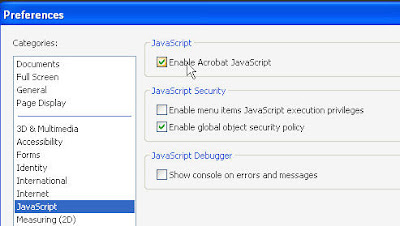 Select Javascript from the Categories menu.
Click the checkbox OFF next to Enable Acrobat JavaScript
YES you CAN!!! and Seth Hardy of Symantec's MessageLabs just did a talk the other day at SecTor 2009 about how he's been able to (in a test lab) create a virus, embed it in a PDF and get past every known antivirus. This is scary stuff folks, and there is one little thing you can do to stop most of it.
HelpNet Security says that a new round of these viruses is out in the wild and Acrobat 9.1.3 is vulnerable, but a patch is coming on Oct. 13th. In the meantime they recommend turning off Javascript.
Open up Adobe Reader/Acrobat and turn off JavaScript! Yes, PDFs can have Javascript, though you've probably never even seen a PDF file that legitimately uses Javascript.
Here is how you do it in Reader 9.1.x :
Click on the Edit menu, click Preferences.
 Select Javascript from the Categories menu.
Click the checkbox OFF next to Enable Acrobat JavaScript
Saturday, October 03, 2009
Loading CD-ROMs On A Netbook
OK, everyone knows that the biggest fall back of a netbook is it's lack of CD-ROM/DVD-ROM drive.
Most people know you can get a USB CD-ROM drive and fix that.
A few know about CD-ROM emulators like the one included with Alcohol 120%... but that has an extra cost.
After a little browsing around the net I found a FREE CD-ROM emulator from Microsoft!
Download the Microsoft Virtual CD-ROM Control Panel package now.
Most people know you can get a USB CD-ROM drive and fix that.
A few know about CD-ROM emulators like the one included with Alcohol 120%... but that has an extra cost.
After a little browsing around the net I found a FREE CD-ROM emulator from Microsoft!
Download the Microsoft Virtual CD-ROM Control Panel package now.
Thursday, October 01, 2009
OWASP top 10
This is a little higher level then what I normally post here, but this is info that every IT guy ought to know about so I feel I should pass this stuff on. October, being Cyber Security Awareness Month, will probably see more than the usual rate of security related posts here, and some may be aimed at IT people, others will be aimed at home users and small business owners.
OWASP Top 10 Security Vulnerabilities Part 1 (Barry Dorrans) from Edge UG on Vimeo.
OWASP Top 10 Security Vulnerabilities Part 2 (Barry Dorrans) from Edge UG on Vimeo.
Friday, September 04, 2009
Gmail Security
There are a few things you really should do if you use Gmail that will make it more secure (and more convenient).
 First, log in and then click the Settings tab as shown.
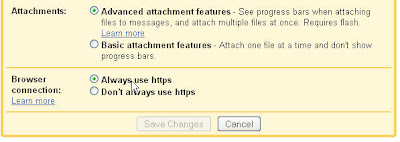 Now scroll down to the bottom and check the "Always use https" option.
This will help keep people from spying on you at public WiFi stations like McDonalds, Starbucks, or the library.
 Now for the more convenient part...
You can actually check Gmail in your own e-mail program! You don't need to log into the website, or to download some special Gmail only software to get the "you have mail" pop-up.
Click on the "Forwarding and POP/IMAP" link.
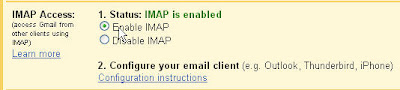 Down at the bottom, again you will find the "Enable IMAP" option. Turn that on.
Then follow the instructions in the Configuration instructions shown as step 2 in the image.
make sure you always select SSL as the connection method. (on port 993)
DO NOT cheat and select the gmail option in Thunderbird if that is your mail client. That will set you up with unencrypted POP mail. Trust me you want SSL encrypted IMAP. In fact, no matter who you are getting your e-mail from, you want SSL, or better yet, TLS encrypted IMAP. POP is so 1994. (and if you run it unencrypted you are enabling "Big Brother"...so maybe I should have said it's so 1984.)
 First, log in and then click the Settings tab as shown.
 Now scroll down to the bottom and check the "Always use https" option.
This will help keep people from spying on you at public WiFi stations like McDonalds, Starbucks, or the library.
 Now for the more convenient part...
You can actually check Gmail in your own e-mail program! You don't need to log into the website, or to download some special Gmail only software to get the "you have mail" pop-up.
Click on the "Forwarding and POP/IMAP" link.
 Down at the bottom, again you will find the "Enable IMAP" option. Turn that on.
Then follow the instructions in the Configuration instructions shown as step 2 in the image.
make sure you always select SSL as the connection method. (on port 993)
DO NOT cheat and select the gmail option in Thunderbird if that is your mail client. That will set you up with unencrypted POP mail. Trust me you want SSL encrypted IMAP. In fact, no matter who you are getting your e-mail from, you want SSL, or better yet, TLS encrypted IMAP. POP is so 1994. (and if you run it unencrypted you are enabling "Big Brother"...so maybe I should have said it's so 1984.)
PCI DSS
If you don't know what PCI-DSS is and you run a business that takes credit cards you need to read this:
 Click for a free PDF copy
The Payment Card Industry (PCI) Data Security Standard (DSS) is something you have already agreed to, and MUST follow. Does your bill for your merchant account include a line about non-compliance fees? This is what it's about.
Click for a free PDF copyThe Payment Card Industry (PCI) Data Security Standard (DSS) is something you have already agreed to, and MUST follow. Does your bill for your merchant account include a line about non-compliance fees? This is what it's about.
GFI LanGuard

There are all kinds of different network vulnerability scanners out there, but the best bet for small businesses is probably GFI Languard.
The reason? It's simple and it's free.
It is an easy to use Windows based program, so no need to learn or install Linux to use it.
It is absolutely free if you have 5 or fewer IP addresses (computers) to scan.
It is free for a 30day trial if you have more than 5 IPs to scan.
Wednesday, September 02, 2009
VirusTotal
VirusTotal is a free service that lets you check a suspicious file against 35 different Antivirus tools.
If you get an e-mail attachment that you really are not sure about, and your own AV doesn't see a problem, you can check it here and know with some certainty that at least no other AV vendor sees the problem.
If you get an e-mail attachment that you really are not sure about, and your own AV doesn't see a problem, you can check it here and know with some certainty that at least no other AV vendor sees the problem.
Monday, August 31, 2009
Secunia - Keep ALL Your Software Up To Date
You have Windows Automatic Update to keep windows itself up to date, and if you remembered to opt in to it maybe you've even upgraded it to Microsoft Update to keep your Office programs up to date too. ...and some software like Firefox and Java have their own updaters, if you didn't disable them to keep your performance up...
But what about all the other programs you run? do you know you are upto date?
Secunia will tell you.
You can go to their web portal for a free scan of your system any time you like, and it will check it all for you. If you are using it at home you can download Secunia PSI (Personal Software Inspector) or if it is for business use there is the cooler sounding Secunia CSI (Corporate...) at a cost, but well worth it.
But what about all the other programs you run? do you know you are upto date?
Secunia will tell you.
You can go to their web portal for a free scan of your system any time you like, and it will check it all for you. If you are using it at home you can download Secunia PSI (Personal Software Inspector) or if it is for business use there is the cooler sounding Secunia CSI (Corporate...) at a cost, but well worth it.
Wednesday, August 26, 2009
SecTor 2009 - Last week for discount pricing

SecTor (Toronto's big InfoSec conference) admission prices go up on Sept 1.
If you haven't got your tickets yet now is the time.
After Sept. 1 it'll cost $250 more to get in to this great IT security conference.
If you are a member of TASK or OWASP You can get an additional 10% off, just look through those mailing lists, there have been discount codes posted.
There are some great speakers booked for this year. I'm really looking forward to it.
Tuesday, August 11, 2009
Canadian pricing for Windows 7 family pack
Windows 7 will be available in a "Family pack" 3 pack of licenses for $200 ($67 each license) for home users wanting to upgrade from XP to Win7 Home Premium.
Read more at Digital Home.
Read more at Digital Home.
Thursday, June 25, 2009

Monday, June 15, 2009
Wednesday, June 10, 2009
BlackBerries and E-Mail
Why is it after all these years in the messaging business BlackBerries cannot handle E-mail as well as my old Pocket PC or Zaurus handhelds did? Sure they weren't cellular, but they could handle POP and IMAP over wired or wireless 802.11 connections without help. Even encrypted IMAP wasn't a problem.
Yes I can access my IMAP account from my Blackberry, but it has to use an intermediary server hosted by RIM which means that I have to enter my e-mail credentials for my private personal account into RIM's server so that it can check my IMAP mail and relay it to my Blackberry. Why doesn't my Blackberry come with an IMAP capable e-mail client?
The way they are doing it now has several problems.
#1 I have to give RIM my account info instead of just inputting it into a device that would normally be on my person.
#2 I can't access anything but the inbox. None of the other folders are available via this 2 stage e-mail retrieval process.
#3 (ok this is more a complaint about the OTHER type of e-mail BlackBerries do....) My BES e-mail from work doesn't get it's own icon like the BIS ones do so while I can look at each of my personal mail accounts individually, when I want to read my work e-mails it's all mixed up with the e-mails from my home accounts.
If I could have encrypted IMAP done on a 400 Mhz ARM processor 8 years ago, why can't my BB Storm do it?
Yes I can access my IMAP account from my Blackberry, but it has to use an intermediary server hosted by RIM which means that I have to enter my e-mail credentials for my private personal account into RIM's server so that it can check my IMAP mail and relay it to my Blackberry. Why doesn't my Blackberry come with an IMAP capable e-mail client?
The way they are doing it now has several problems.
#1 I have to give RIM my account info instead of just inputting it into a device that would normally be on my person.
#2 I can't access anything but the inbox. None of the other folders are available via this 2 stage e-mail retrieval process.
#3 (ok this is more a complaint about the OTHER type of e-mail BlackBerries do....) My BES e-mail from work doesn't get it's own icon like the BIS ones do so while I can look at each of my personal mail accounts individually, when I want to read my work e-mails it's all mixed up with the e-mails from my home accounts.
If I could have encrypted IMAP done on a 400 Mhz ARM processor 8 years ago, why can't my BB Storm do it?
Friday, May 22, 2009
Why isn't Apple giving us a patch?
Why isn't Apple giving us a patch for the java bug that Sun fixed 5 months ago?
SANS Internet Storm Center doesn't know either.
http://isc.sans.org/diary.html?storyid=6442&rss
SANS Internet Storm Center doesn't know either.
http://isc.sans.org/diary.html?storyid=6442&rss
Wednesday, May 20, 2009
Klingons need antivirus too.
http://www.sophos.com/klingon/
You think you're immune just because you run MacOS or Linux, but not even the Klingons can keep today's malware at bay without a little help.
You think you're immune just because you run MacOS or Linux, but not even the Klingons can keep today's malware at bay without a little help.
Subscribe to:
Posts (Atom)


