The video game geeks know it already as Project Natal, but it's been re-named Kinect and it's the hottest upcoming Video game technology. You can preorder a kinect set now for about $150 for the special motion tracking camera (EBGames is taking orders), plus you will need some new Kinect games.
The cool thing about Kinect is that it has no controller, just a camera that sits on top of the TV.
PS3 is doing something similar, but will use the standard Playstation Eye camera and add a lightsabre-like controlller so that you still have buttons to push and it should improve the camera's tracking... but back to Natal um, I mean, Kinect.
Here is what it looks like:
Tuesday, June 15, 2010


Friday, June 11, 2010
FortiGate signature for Robint.us Mass Website Hack
This is highly technical and goes beyond the "tech tips for everyday users" that I initially intended Rod'sTech to be about, but it's important and I want to share this with the InfoSec community.
If you haven't heard of this mass SQL injection hack that happened recently read about it on one or more of these sites:
http://blog.sucuri.net/2010/06/mass-infection-of-iisasp-sites-robint-us.html
http://www.net-security.org/secworld.php?id=9395&utm_source=feedburner&utm_medium=email&utm_campaign=Feed%3A+HelpNetSecurity+%28Help+Net+Security%29
For users of FortiGate brand UTM firewalls I've put together a FortiGate IPS custom signature that should help by blocking/reporting on infected sites.
It is:
F-SBID( --name "robint-us-web-ad-hack"; --protocol tcp; --flow bi_direction; --pattern "ww.robint.us/u.js}{/script}"; --service HTTP; --context body; )
Open up your FortiGate system, go to Intrusion Protection|Signature and click the Custom Tab at the top. Click the "Create New" button.

Paste in the code (remember to make the modifications I mentioned) and name it robint-us-web-ad-hack. Click OK.
Now click IPS Sensor on the left hand menu, and choose your sensor (If you are not using IPS refer to the FortiGate manuals. It is way beyond the scope of this blog post to tell you how to set that up) Click the little edit button in the right-most column next to the sensor you want it in.
Click the "Add Custom Override" button.
 Fill in the Signature name and check enable, select the action you want to take and select logging to get your alerts.
If you haven't heard of this mass SQL injection hack that happened recently read about it on one or more of these sites:
http://blog.sucuri.net/2010/06/mass-infection-of-iisasp-sites-robint-us.html
http://www.net-security.org/secworld.php?id=9395&utm_source=feedburner&utm_medium=email&utm_campaign=Feed%3A+HelpNetSecurity+%28Help+Net+Security%29
For goodness sake, do not go looking for the URL mentioned here with a JavaScript enabled browser!
For users of FortiGate brand UTM firewalls I've put together a FortiGate IPS custom signature that should help by blocking/reporting on infected sites.
It is:
F-SBID( --name "robint-us-web-ad-hack"; --protocol tcp; --flow bi_direction; --pattern "ww.robint.us/u.js}{/script}"; --service HTTP; --context body; )
Note: You will have to replace } with > and { with < in the pattern section to make the signature work. I cannot publish it in full here or it might trigger the attack accidentally if a browser parsed it as an instruction.
Open up your FortiGate system, go to Intrusion Protection|Signature and click the Custom Tab at the top. Click the "Create New" button.

Paste in the code (remember to make the modifications I mentioned) and name it robint-us-web-ad-hack. Click OK.
Now click IPS Sensor on the left hand menu, and choose your sensor (If you are not using IPS refer to the FortiGate manuals. It is way beyond the scope of this blog post to tell you how to set that up) Click the little edit button in the right-most column next to the sensor you want it in.
Click the "Add Custom Override" button.

Thursday, June 10, 2010
Good InfoSec Ad
Note: I in no way intend this to be an endorsement of the company that made the ad, I just thought it was a neat ad.
Wednesday, June 02, 2010
Microsoft Baseline Security Analyzer
Most every IT pro has heard of and (hopefully) tried MBSA at some point, but here's a reminder for those who haven't revisted it in a while, and a step by step how to for anyone new to this tool.
This is EASY to use and everyone should check their systems against this tool from time to time.

This is EASY to use and everyone should check their systems against this tool from time to time.
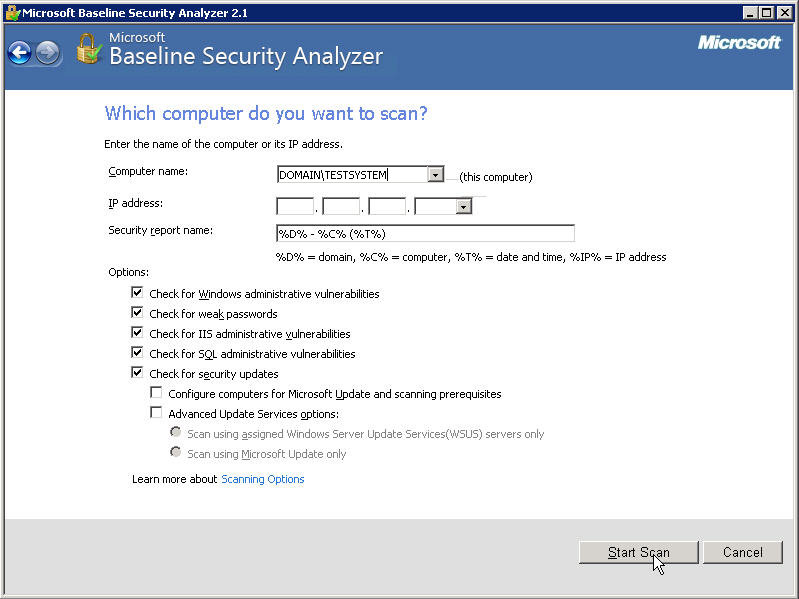
- Download the tool.
- Install it. (Double click the exe file you just downloaded.)
- Go to Start|All Programs|Microsoft Baseline Security Analyzer 2.1
- Choose if you want to scan one computer or multiple computers.
- Fill in what computer(s) you want to test (you must be administrator on them)
- Click Start Scan
- Sit back and drink your coffee.
Friday, May 28, 2010
Keeping Your Kids Safe Online
For parents looking for something to teach kids about online safety, there is
Zoe and Molly Online. It is a web comic and quiz designed to teach children about possible dangers online. It was created by the Canadian Centre for Child Protection, in partnership with Shaw Communications Inc. It's being introduced to kids at school all over the country.
If you find something online that exploits children report it here: http://www.cybertip.ca
Zoe and Molly Online. It is a web comic and quiz designed to teach children about possible dangers online. It was created by the Canadian Centre for Child Protection, in partnership with Shaw Communications Inc. It's being introduced to kids at school all over the country.
If you find something online that exploits children report it here: http://www.cybertip.ca
Friday, May 21, 2010
Hotmail Gets More Secure
Following Google's lead, Microsoft has made the SSL/TLS secured http (https://) protocol the default for Hotmail.
In addition, Microsoft has started an attempt to make the users more aware of possible phishing attempts by marking the e-mails they have verified as coming from a legitimate source with a green shield icon.
Spam filtering finally gets personalized. You can now mark senders (who are not necessarily on your contact list) that you don't want to be sent to the junk mail folder.
And perhaps the most innovative feature, if you are away from home and accessing your e-mail from a public workstation (like a cyber-cafe or library) or simply on an unsecured wireless network and want to have the added assurance that your password will not be compromised, you can request a one-time password to be sent to your phone.
In addition, Microsoft has started an attempt to make the users more aware of possible phishing attempts by marking the e-mails they have verified as coming from a legitimate source with a green shield icon.
Spam filtering finally gets personalized. You can now mark senders (who are not necessarily on your contact list) that you don't want to be sent to the junk mail folder.
And perhaps the most innovative feature, if you are away from home and accessing your e-mail from a public workstation (like a cyber-cafe or library) or simply on an unsecured wireless network and want to have the added assurance that your password will not be compromised, you can request a one-time password to be sent to your phone.
Tuesday, May 18, 2010
SecTor 2010
I registered before the Early Bird price expired again this year, and boy am I glad I did. Looking at the first round of speakers that have been announced... There are a few I'm really looking forward to, but none more than HD Moore's talk on Metasploit and penetration testing.
For those who don't know what that's all about, penetration testing is basically simulating a cyber attack. HD Moore Is one of the world's most recognized names in this field because he started the Metasploit Project to create an open framework of tools to do such testing.
This is the direction I'd like to take my career in. I'm really excited about a chance to meet HD.
For those who don't know what that's all about, penetration testing is basically simulating a cyber attack. HD Moore Is one of the world's most recognized names in this field because he started the Metasploit Project to create an open framework of tools to do such testing.
This is the direction I'd like to take my career in. I'm really excited about a chance to meet HD.
Cyber Security In Canada?
A CSIS memo says risk of cyber attacks on the rise. (No surprise to me or anyone else in the computer security industry.)
Check out this video clip from CBC's The National
So far Canada doesn't have a comprehensive plan. By contrast, the USA is spending $40 billion on cyber security. Are we falling too far behind?
Public Safety Canada says that a national strategy is pending, I hope it's worth the wait.
Check out this video clip from CBC's The National
So far Canada doesn't have a comprehensive plan. By contrast, the USA is spending $40 billion on cyber security. Are we falling too far behind?
Public Safety Canada says that a national strategy is pending, I hope it's worth the wait.
Friday, May 07, 2010
The Very Real Dangers Of Photocopiers
In case you missed it, the internet's been all a-buzz about the dangers of photocopiers from a privacy and information data leakage point of view.
CBS did a great little 5 minute segment on this, here it is:
Watch CBS News Videos Online
CBS did a great little 5 minute segment on this, here it is:
Watch CBS News Videos Online
Tuesday, May 04, 2010
How To Start using E-mail Encryption (Part 1)
I called this "Part 1" because there are a number of different ways to encrypt e-mail, and this is the one I use, but over time I will try to cover others.
Why encrypt? E-mail is sent in plain text. If you are careful, you connect to your ISP's mail server using SSL encrypted transports. (the https:// page of a webmail, or using the SSL versions of POP or IMAP as explained in my previous post about Gmail security). If you are lucky, your ISP might use SSL encrypted transports beween their server and the next server (still not common practice), but plain text versions sit on the disk at both servers, and eventually on the computer of your intended recipient. The recipient we are not worried about, but if it's not something you want the mail man reading you don't put it on the back of a post card, you stick it in an envelope. That's encryption. SSL trasport encryption is like those big yellow interoffice mail envelopes. All your stuff goes into one of those for transport across the office and is opened when it gets to the right department. PGP (Pretty Good Privacy) or GPG (Gnu Privacy Guard, the opensource version of PGP) is like mailing your letter in a lockbox that only your recipient has a key for.
So how do you set up GPG for personal use?
First, if you are still using Outlook Express as a mail client, switch to Thunderbird. No, really. Outlook Express is a bad mail client anyway, and the integration with PGP and GPG is dismal.
If you are using the full blown Outlook you must be using it for corporate use, just buy PGP it integrates seamlessly.
Now for those already using Thunderbird (or new converts from Outlook Express), download the appropriate version of the Enigmail Add-on and GNUPG for your OS. (Gpg4win if you are on windows)
Install GPG. Install the Enigmail add-on into Thunderbird
When you have Enigmail installed you will see a couple of new menu items and icons at the top like this:

Then you need to create a GPG key, associate your key with your e-mail address in Thunderbird, and set the settings of when you want your key to be used for signing and encrypting. I recommend that you set it to encrypt automatically if the contact has a known encryption key.
Follow the instructions that came with your version of GPG for creating a new key.
Associating a key with your e-mail address is pretty easy.
Open the account settings in Thunderbird (where you set your e-mail address), there is a new menu item there too.
 If this is your first time ever using GPG/PGP then you can probably leave it set to use e-mail address to identify OpenPGP key. If you have old keys floating around or use multiple keys select the Use specific OpenPGP key option.
Select whether you want it to insist you sign messages or not.
Back to that OpenPGP menu item on the main window... Click it
 Select Preferences.
The most important setting in this menu is this one:
 When sending mail, Add my own key to the recipients list. If you don't select that you won't be able to read your own sent mail when you encrypt.
Next to that I'd say selecting the Encrypt replies to encrypted messages is a good one to check. If someone went to the trouble of securing communications with you, you don't want to reply to them in the clear.
Now when you go to write a message there is a new option icon at the top of that screen:

Now you just need some PGP public keys of friends to send encrypted mail to. Here's mine. Have fun, and stay out of trouble. :)
Why encrypt? E-mail is sent in plain text. If you are careful, you connect to your ISP's mail server using SSL encrypted transports. (the https:// page of a webmail, or using the SSL versions of POP or IMAP as explained in my previous post about Gmail security). If you are lucky, your ISP might use SSL encrypted transports beween their server and the next server (still not common practice), but plain text versions sit on the disk at both servers, and eventually on the computer of your intended recipient. The recipient we are not worried about, but if it's not something you want the mail man reading you don't put it on the back of a post card, you stick it in an envelope. That's encryption. SSL trasport encryption is like those big yellow interoffice mail envelopes. All your stuff goes into one of those for transport across the office and is opened when it gets to the right department. PGP (Pretty Good Privacy) or GPG (Gnu Privacy Guard, the opensource version of PGP) is like mailing your letter in a lockbox that only your recipient has a key for.
So how do you set up GPG for personal use?
First, if you are still using Outlook Express as a mail client, switch to Thunderbird. No, really. Outlook Express is a bad mail client anyway, and the integration with PGP and GPG is dismal.
If you are using the full blown Outlook you must be using it for corporate use, just buy PGP it integrates seamlessly.
Now for those already using Thunderbird (or new converts from Outlook Express), download the appropriate version of the Enigmail Add-on and GNUPG for your OS. (Gpg4win if you are on windows)
Install GPG. Install the Enigmail add-on into Thunderbird
When you have Enigmail installed you will see a couple of new menu items and icons at the top like this:

Then you need to create a GPG key, associate your key with your e-mail address in Thunderbird, and set the settings of when you want your key to be used for signing and encrypting. I recommend that you set it to encrypt automatically if the contact has a known encryption key.
Follow the instructions that came with your version of GPG for creating a new key.
Associating a key with your e-mail address is pretty easy.
Open the account settings in Thunderbird (where you set your e-mail address), there is a new menu item there too.

Select whether you want it to insist you sign messages or not.
Back to that OpenPGP menu item on the main window... Click it

The most important setting in this menu is this one:

Next to that I'd say selecting the Encrypt replies to encrypted messages is a good one to check. If someone went to the trouble of securing communications with you, you don't want to reply to them in the clear.
Now when you go to write a message there is a new option icon at the top of that screen:

Now you just need some PGP public keys of friends to send encrypted mail to. Here's mine. Have fun, and stay out of trouble. :)
-----BEGIN PGP PUBLIC KEY BLOCK-----
Version: SKS 1.1.0

mQGiBEokPi0RBACEx42f/6jaMTyWSfi3165ew22znJ2lUc3hW635/uWw6kD12G3eWqe7Ph74
wMaUanH/pK0ReTHwkds7pMRU0+e+k9bX0xmwAmzVlmp8E2MpLJ9GN5c/Dl7y2wkP2b1LGszl
L51ub4KZfZUxZDDCuNu6kZoUw5rLo44XPc0wonP00wCgzkWraKCG/MVqTx7sfN4R1xoPDxUE
AIH7p3/n0smBGYqSSPxGEpzqzAmfKR4vnz38SEDlSqCtI4gv1OtW9/ujVXr4JdOD+cvPstPj
oeeluGsYDdsi/c3CVAf63sKCHoqEE8LmM2syvULA7RdkZ9bvtvyP1wtH25e/weHSUVWdX/ou
x/HG0P952O+tt95w0sYbuWWMKoQNA/4olQ6g/tT9D6hHUPfg3OZjTzIxbWreafg5ZcRoVsCy
sMyyQH7zWpzOvy1sZAg5KynvZFqmij4VBRulcieh6Yuz7lYO2XarpYlmoOa8JcbCNHIutkts
HT8DHSy18Kiq6RA1gqbT/3tmDsDfYNWEGX379GWM0l9f/3mtw2YQGFRcp7QnUm9kIE1hY1Bo
ZXJzb24gPHJvZEBtYWNwaGVyc29uY2xhbi5jb20+iGAEExECACAFAkokPi0CGwMGCwkIBwMC
BBUCCAMEFgIDAQIeAQIXgAAKCRClLPlKUhouNpKdAKCK9xZ/T0POQLJjn7/bjanGJIxmTgCg
rirVjRUGAOX+pe+X/KWvJwwxyoy5Ag0ESiQ+LRAIAMZcPrDRfiDkPLQPrDqPSBEbyQBBXqhU
5kwdFGyPTJzvluLz4NBvX8JsetQ95FTBQe5e03j+VKrzSPNglXtPYxKLbt6fpNJALF2lmPNU
Jm2ppp8PsFwUe1zPUZyf05OohHqpXper8Wpzp3C7fVFTC7Ii7hBPEyo7y/0RLd6u40X3a+5M
q/57QXAa8lqm006aG70ScDhtYvT6f8mKBWu+fgD7G5EMT8ICcO78qXLMtWv0R48UPXoqM4GM
TrVhlZSwGY5HvY/L8RtUI9irZMH2LoreXRbTaWwYzapJsw3C6oHyeb9hpCbbnwdbrKnRmeMY
VqdED2eYOY6VIJ6/vLD4QF8ABAsIAIdQWUOfNY/x7+ZDDdat62dyabzlNFk6YN444WQ+8Qno
9346gxtp4BMH8O0UksYkXl5KeCiMofMTQlZFCSdfTs5QK6NbkT5Yes/mchAJy5749zvGdVnJ
HZD6cIaCwYaf4nKbyZP4qyJK7hdBvMeNfaPI131OPtmA8DHxnb8pjPYbdTRbJ0/++iP4HcQU
sAvIY9+WXDHUMjDolfa4GtEemsudM+sBGrz5Sv4Jm3vvXazcDO4ehgIflXvF4w32OEYk+3Y5
VuSY4qBbRZlaAwdzlUcr4XMdW0518HJw9U9l+33C0D3o9klt7NzSAeLvloDdEmY1A1xd31Ue
7KuGEP2InEOISQQYEQIACQUCSiQ+LQIbDAAKCRClLPlKUhouNnfiAKCx0e8IUsBXCGDp5/Za
ZUathieLqgCaAz1aqmbfvvDM5jYDOhlW038OHJc=
=E1F/
-----END PGP PUBLIC KEY BLOCK-----
Sunday, May 02, 2010
Tuesday, April 27, 2010
Certified Ethical Hacker?
Yes, there is such a thing.
Although, I'd say that it certifies neither that you are a hacker, nor that you are ethical.... but it does show that you have been exposed to a wide variety of tools that hackers might use to invade your network, so that you will recognize them if you ever come across them, and you will be able to use them to test your own defenses.
("testing" someone elses defenses without written approval is illegal!)
I strongly recommend that, as a minimum, every network security professional should have this certificate. It took me very little time, most of which was spent finding and playing with some of the programs, and very little money (less than $300 including the test and the review guide) to get this, and, while it is not the most prestigious certification on the planet (My CISSP is something I prize far more), preparing for it was a good review of all the "hacker tools" I'd read about in the past 10 years, and reminded me of some tools for network administration that I'd neglected that have made life much easier (like Microsoft's PSTools)
 Update: April 29, 2010
So what does an Ethical Hacker do?
An Ethical Hacker tests a corporation's network defenses under contract by that corporation to identify weaknesses in the company's information security, so that the company can fix the problems before a malicious hacker (or cracker) finds and takes advantage of that weakness.
Why would a compnay need to hire an Ethical Hacker?
They don't want to be the next TJX. Some government regulations require companies in certain industries to have Penetration Testing (simulated hacking) done on a regular basis. The Payment Card Industry Data Security Standard (PCI-DSS) requires larger companies to have at least regular vulnerability assessments done. Ethical Hackers can help with some of these goals.
Why did I get certified?
I want to take the EC-Council Certified Security Administrator (ECSA) course later this year, and probably then become a Licensed Penetration Tester (LPT). To do that I needed to first get the CEH certificate.
Although, I'd say that it certifies neither that you are a hacker, nor that you are ethical.... but it does show that you have been exposed to a wide variety of tools that hackers might use to invade your network, so that you will recognize them if you ever come across them, and you will be able to use them to test your own defenses.
("testing" someone elses defenses without written approval is illegal!)
I strongly recommend that, as a minimum, every network security professional should have this certificate. It took me very little time, most of which was spent finding and playing with some of the programs, and very little money (less than $300 including the test and the review guide) to get this, and, while it is not the most prestigious certification on the planet (My CISSP is something I prize far more), preparing for it was a good review of all the "hacker tools" I'd read about in the past 10 years, and reminded me of some tools for network administration that I'd neglected that have made life much easier (like Microsoft's PSTools)

So what does an Ethical Hacker do?
An Ethical Hacker tests a corporation's network defenses under contract by that corporation to identify weaknesses in the company's information security, so that the company can fix the problems before a malicious hacker (or cracker) finds and takes advantage of that weakness.
Why would a compnay need to hire an Ethical Hacker?
They don't want to be the next TJX. Some government regulations require companies in certain industries to have Penetration Testing (simulated hacking) done on a regular basis. The Payment Card Industry Data Security Standard (PCI-DSS) requires larger companies to have at least regular vulnerability assessments done. Ethical Hackers can help with some of these goals.
Why did I get certified?
I want to take the EC-Council Certified Security Administrator (ECSA) course later this year, and probably then become a Licensed Penetration Tester (LPT). To do that I needed to first get the CEH certificate.
Thursday, February 11, 2010
Microsoft End Of Support Coming Up Soon For Some Versions Of Windows
After April 13, 2010, Microsoft will no longer issue security updates for Vista RTM (release to manufacturing). Vista users are encouraged to upgrade to Vista Service Pack 1 or Service Pack 2 if they have not already.
I'd personally recommend SP2.
After July 13, 2010, Microsoft will no longer support Windows 2000 at all, and will no longer issue security updates for Windows XP SP2. If you are still running Windows XP SP2 upgrade to SP3, or Windows 7.
I'd personally recommend SP2.
After July 13, 2010, Microsoft will no longer support Windows 2000 at all, and will no longer issue security updates for Windows XP SP2. If you are still running Windows XP SP2 upgrade to SP3, or Windows 7.
Wednesday, January 20, 2010
The "Aurora" Attack That Got Google And Adobe
This is why you MUST get off IE6 and onto an up to date version, and KEEP it up to date, and run an up to date Antivirus.
I'm sorry, this is really technical, but it is important.
YouTube video courtesy of Sophos Antivirus.
I'm sorry, this is really technical, but it is important.
YouTube video courtesy of Sophos Antivirus.
Thursday, January 14, 2010
Gmail Now Secured By Default
Google has decided to make the SSL encrypted sessions in Gmail on by default now!
I talked about this little known option back in September. You no longer have to go into the settings to turn it on, it's on by default now. Yay Google!
Now if only Hotmail, and Yahoo mail would follow the lead.
[UPDATE: May 2010]
Hotmail has followed suit! now Yahoo where's your update???
I talked about this little known option back in September. You no longer have to go into the settings to turn it on, it's on by default now. Yay Google!
Now if only Hotmail, and Yahoo mail would follow the lead.
[UPDATE: May 2010]
Hotmail has followed suit! now Yahoo where's your update???
Tuesday, January 12, 2010
Why Isn't Apple Giving Us A Patch? (Again!)
Why does Apple sit on bugs that have already been fixed by others for so long?
http://mobile.darkreading.com/9287/show/f4a5b8931d4d475c18ae22de0f497db3&t=dafc4b74d510e5f9ebf32b0d1a1a7475
Remember the Java one that hit the news back in May? At least you could get your Java elsewhere.
http://mobile.darkreading.com/9287/show/f4a5b8931d4d475c18ae22de0f497db3&t=dafc4b74d510e5f9ebf32b0d1a1a7475
Remember the Java one that hit the news back in May? At least you could get your Java elsewhere.
Sunday, December 27, 2009
SmartSwipe (and HomeATM)- A Very Smart Tool For The Cautious Online Shopper
I hadn't heard of this device until I was leafing through the Hammacher Schlemmer catalog tonight and the claim of a credit card reader that you plug in to your USB port that will read your credit card and encrypt the card info, and insert it into the browser, pre-encrypted, to be securely transmitted to any online store without ever passing the unencrypted data to the user's computer caught my attention.
The device is the SmartSwipe by Canadian company NetSecure.
I had a hard time believing that what the catalog was claiming was possible, but then after reading the white-paper on it at the SmartSwipe site I think it's incredibly smart. With this device installed, it's driver is used by the web browser as an encryption engine. The browser (for now it only works with IE) passes off the unencrypted form to the device, which inserts the creditcard data into the form an encrypts the page before passing it back to the browser to transmit to the store website. The device does the encryption, not the browser, so since the card scanning and encryption are done outside the computer, there is no unencrypted data for spyware running on the user's PC to read.
Normally, if you typed it in yourself, there are a number of places where spyware or keyloggers could grab the unencrypted data before the browser gets a chance to encrypt it to pass it securely over the net to the store.
This way the spyware would have to be running on the card reader (which for now anyway, isn't an issue, no one has written spyware that runs in the external card reader) so, it is safe from all the current spyware until it gets to the store's end of the chain.
These are very nice, and I hope that they manage to work deals with the major manufacturers to install these, or better yet, a next generation chip and pin version directly into new PCs.
The SmartSwipe is probably not the only such device out there, the technology to look for if you find another device like it is called Dynamic SSL. I believe Dynamic SSL is the future for secure online shopping.
For a little company from Saskatchewan, they certainly have made inroads with this device being carried by Costco, Futureshop, Dell and Amazon already, and it only works with 32 bit Internet Explorer so far. Once it works with other browsers it'll probably become a commonplace tool for regular internet shoppers.
[Ed note: Only a few hours after the initial post which mentioned only SmartSwipe, a sales person from Home ATM posted a comment. Therefore I have changed the title to reflect that. Having read the website at http://www.homeatm.net I cannot say for sure how the HomeATM works, but I am really disappointed in the video demo that they use to show how secure it is. The fault in the video isn't really with the device itself, but the method that Western Union used to send the money that was taken from his account to the recipient.
Sure, it was securely transferred from his account to Western Union, but then Western Union sent an unencrypted e-mail to a Gmail account with a web link and all the details including a password needed to retrieve the funds. Anyone who could intercept that e-mail could take the money before it got to the recipient. Sure, then it is securely transferred to the hacker's account from Western Union, but the intended recipient is left with nothing.
It is not the device's fault how Western Union chose to implement the transfer, what W.U. should have done was what the Canadian banks on the Interac system do and have the user create a password that they tell the recipient OUT OF BAND so that an intercepted e-mail transfer is still secured by a password that is not known to the intercepting bad guy. It is a poor marketing choice to use a video of a system with such an obvious security problem to demonstrate a security device.
The biggest problem I see with the device itself, aside from being a magstripe and PIN device as opposed to Chip and PIN (which I'm sure will be the next version) is that there doesn't seem to be any way to actually get one.]
The device is the SmartSwipe by Canadian company NetSecure.
I had a hard time believing that what the catalog was claiming was possible, but then after reading the white-paper on it at the SmartSwipe site I think it's incredibly smart. With this device installed, it's driver is used by the web browser as an encryption engine. The browser (for now it only works with IE) passes off the unencrypted form to the device, which inserts the creditcard data into the form an encrypts the page before passing it back to the browser to transmit to the store website. The device does the encryption, not the browser, so since the card scanning and encryption are done outside the computer, there is no unencrypted data for spyware running on the user's PC to read.
Normally, if you typed it in yourself, there are a number of places where spyware or keyloggers could grab the unencrypted data before the browser gets a chance to encrypt it to pass it securely over the net to the store.
This way the spyware would have to be running on the card reader (which for now anyway, isn't an issue, no one has written spyware that runs in the external card reader) so, it is safe from all the current spyware until it gets to the store's end of the chain.
These are very nice, and I hope that they manage to work deals with the major manufacturers to install these, or better yet, a next generation chip and pin version directly into new PCs.
The SmartSwipe is probably not the only such device out there, the technology to look for if you find another device like it is called Dynamic SSL. I believe Dynamic SSL is the future for secure online shopping.
For a little company from Saskatchewan, they certainly have made inroads with this device being carried by Costco, Futureshop, Dell and Amazon already, and it only works with 32 bit Internet Explorer so far. Once it works with other browsers it'll probably become a commonplace tool for regular internet shoppers.
[Ed note: Only a few hours after the initial post which mentioned only SmartSwipe, a sales person from Home ATM posted a comment. Therefore I have changed the title to reflect that. Having read the website at http://www.homeatm.net I cannot say for sure how the HomeATM works, but I am really disappointed in the video demo that they use to show how secure it is. The fault in the video isn't really with the device itself, but the method that Western Union used to send the money that was taken from his account to the recipient.
Sure, it was securely transferred from his account to Western Union, but then Western Union sent an unencrypted e-mail to a Gmail account with a web link and all the details including a password needed to retrieve the funds. Anyone who could intercept that e-mail could take the money before it got to the recipient. Sure, then it is securely transferred to the hacker's account from Western Union, but the intended recipient is left with nothing.
It is not the device's fault how Western Union chose to implement the transfer, what W.U. should have done was what the Canadian banks on the Interac system do and have the user create a password that they tell the recipient OUT OF BAND so that an intercepted e-mail transfer is still secured by a password that is not known to the intercepting bad guy. It is a poor marketing choice to use a video of a system with such an obvious security problem to demonstrate a security device.
The biggest problem I see with the device itself, aside from being a magstripe and PIN device as opposed to Chip and PIN (which I'm sure will be the next version) is that there doesn't seem to be any way to actually get one.]
Friday, December 18, 2009
New Adobe Reader Vunerability
Adobe Acrobat has another newly discovered 0 day vulnerability.
As usual the fix is to disable JavaScript in Acrobat Reader. Adobe won't have a patch out till Jan 12.
If you have to do it network wide follow the instructions from this post I did back in October to do it via logon scripts.
Upgrade to 9.2 even though it is technically vulnerable, if you turn off JavaScript (which you should do even after the patch is out) 9.2 will let you enable JavaScript on a document by document basis as needed. (usually it is NOT necessary)
As usual the fix is to disable JavaScript in Acrobat Reader. Adobe won't have a patch out till Jan 12.
If you have to do it network wide follow the instructions from this post I did back in October to do it via logon scripts.
Upgrade to 9.2 even though it is technically vulnerable, if you turn off JavaScript (which you should do even after the patch is out) 9.2 will let you enable JavaScript on a document by document basis as needed. (usually it is NOT necessary)
Monday, December 14, 2009
Xmas Gifts For Techies 2009
Ok, it's already Dec 14, you only have 10 days of Xmas shopping left. If you haven't already got a big gift for your resident techie, here are a few ideas:
1. PS3 slim. One of the first posts on this blog back in 2006 was the PS3 line watch. Back then I was drooling with anticipation of the upcoming PS3. I bought one in the summer of 2007 because I was stuck at home all day for a few months because of a car accident. ...even back then with hardly any games available it was fun. The new slim version is out now for this Xmas season. It doesn't play PS2 games anymore, and only plays PS1 games if you download them from the online store (about $6 each) but there are lots of PS3 games and bluray movies out now so that's not much of an issue, and if it is, you can always pick up a PS2 slim to go with it for peanuts.
2. Drobo. Every techie needs more disk space... constantly. Drobo will manage it all by itself. You just stick a disk in, when you need more space you stick in another disk, when you need more, stick in another. when you run out of slots to stick disks into you pull out the smallest disk and stick a bigger one in in it's place. No config, no copying files around, it takes care of it all for you.
3. ReadyNAS. For the techie that has more stringent requirements for his/her data storage, ReadyNAS is like Drobo on steroids.
4.Amazon's Kindle e-book reader. For a geek or a book lover (or a geeky book lover) this is a great gift idea. It stores and displays (in black and white) books and magazines bought through Amazon or downloaded as PDF. It has a rechargeable battery, but it only needs to be charged about once a week, even when the wireless is left on all the time. You can go much longer than that if you remember to turn off the wireless connection when you aren't actually downloading a new book.
1. PS3 slim. One of the first posts on this blog back in 2006 was the PS3 line watch. Back then I was drooling with anticipation of the upcoming PS3. I bought one in the summer of 2007 because I was stuck at home all day for a few months because of a car accident. ...even back then with hardly any games available it was fun. The new slim version is out now for this Xmas season. It doesn't play PS2 games anymore, and only plays PS1 games if you download them from the online store (about $6 each) but there are lots of PS3 games and bluray movies out now so that's not much of an issue, and if it is, you can always pick up a PS2 slim to go with it for peanuts.
2. Drobo. Every techie needs more disk space... constantly. Drobo will manage it all by itself. You just stick a disk in, when you need more space you stick in another disk, when you need more, stick in another. when you run out of slots to stick disks into you pull out the smallest disk and stick a bigger one in in it's place. No config, no copying files around, it takes care of it all for you.
3. ReadyNAS. For the techie that has more stringent requirements for his/her data storage, ReadyNAS is like Drobo on steroids.
4.Amazon's Kindle e-book reader. For a geek or a book lover (or a geeky book lover) this is a great gift idea. It stores and displays (in black and white) books and magazines bought through Amazon or downloaded as PDF. It has a rechargeable battery, but it only needs to be charged about once a week, even when the wireless is left on all the time. You can go much longer than that if you remember to turn off the wireless connection when you aren't actually downloading a new book.
Network Vulnerability Scanners
Back in September I mentioned that GFI LanGuard was available for free for small companies or home use where you only needed to scan 5 PCs.
One other option that has come up since then is the new much easier to use web-based Nessus 4.2.
Nessus has always been free for home users, but now I feel that it's easy enough for most home users to set up. It comes in a windows version, and there is only the server end to set up now, everything else is done through a browser.
Unfortunately the Pro version of Nessus is a little pricey for the average small business at $1200 per year, but you can hire a pro, like me, to come in and scan your network on a regular basis with this tool for probably a fair bit less than that. (pro licenses are not tied to a physical network, but limited to one machine... so if that machine is a laptop, a pro feed license can go wherever the security contractor takes it.)
Rapid 7 has also recently released NeXpose Community Edition, which I have yet to try out, but is free to use for a network of up to 32 PCs, and there is the open source OpenVAS, which was spun off from Nessus back at version 2, when Nessus was still an open source project. These 2 options I suspect would be more difficult to get up and running than the first two, as they are really aimed at folks with a high level of tech knowledge. NeXpose comes in several other versions for varying levels of additional features, and larger networks, but it is more expensive than the Nessus Pro feed, so very much out of the reach of the average small business or home user, but the Community edition is supposed to be very good, and I'll be playing around with it in the next few weeks and I will let you all know what I think.
No matter which you choose, scanning your network, especially for business networks, is an important part of keeping your network secure. If you don't scan it to find the holes in your security, someone else will, and they probably won't point out the holes to you, they'll probably just use those holes in ways you don't want them to.
One other option, from the folks at Rapid 7 is the free online scan. You can scan 2 IP addresses for free from the internet at http://www.rapid7.com/freescan.jsp This should give you an idea of how exposed your servers that are attached to the internet are. This will only scan public Internet IP addresses. It is probably best to get a local scanner set up or hire a pro to come in and scan the private address space as well, especially if you use wireless.
One other option that has come up since then is the new much easier to use web-based Nessus 4.2.
Nessus has always been free for home users, but now I feel that it's easy enough for most home users to set up. It comes in a windows version, and there is only the server end to set up now, everything else is done through a browser.
Unfortunately the Pro version of Nessus is a little pricey for the average small business at $1200 per year, but you can hire a pro, like me, to come in and scan your network on a regular basis with this tool for probably a fair bit less than that. (pro licenses are not tied to a physical network, but limited to one machine... so if that machine is a laptop, a pro feed license can go wherever the security contractor takes it.)
Rapid 7 has also recently released NeXpose Community Edition, which I have yet to try out, but is free to use for a network of up to 32 PCs, and there is the open source OpenVAS, which was spun off from Nessus back at version 2, when Nessus was still an open source project. These 2 options I suspect would be more difficult to get up and running than the first two, as they are really aimed at folks with a high level of tech knowledge. NeXpose comes in several other versions for varying levels of additional features, and larger networks, but it is more expensive than the Nessus Pro feed, so very much out of the reach of the average small business or home user, but the Community edition is supposed to be very good, and I'll be playing around with it in the next few weeks and I will let you all know what I think.
No matter which you choose, scanning your network, especially for business networks, is an important part of keeping your network secure. If you don't scan it to find the holes in your security, someone else will, and they probably won't point out the holes to you, they'll probably just use those holes in ways you don't want them to.
One other option, from the folks at Rapid 7 is the free online scan. You can scan 2 IP addresses for free from the internet at http://www.rapid7.com/freescan.jsp This should give you an idea of how exposed your servers that are attached to the internet are. This will only scan public Internet IP addresses. It is probably best to get a local scanner set up or hire a pro to come in and scan the private address space as well, especially if you use wireless.
Subscribe to:
Posts (Atom)


