If you are planning to buy a new Tesla model S, 3, X, or Y follow my referral link and you could get 1000 miles/1500 km of free supercharging.
Saturday, January 02, 2021
Tesla Supercharging


Wednesday, July 25, 2018
What is with Aruba and all their different console cables?
So It used to be that Aruba WiFi used the industry standard RJ-45 rollover RS-232 cable that Cisco pioneered. Then they experimented a little with USB to RS-232 built into some of their outdoor APs so that you would just plug a, then standard, USB to USB Mini-B cellphone cable into it and wala! you had serial connection over USB.
Then there was the TTL pins in the low end equipment where 4 pins were exposed allowing them to cut the TTL to RS232 circuit out for cost savings.... and that bled into the 305 model, which replaced the 205 and 105 before it that had RJ-45 consoles, but you know, cost savings....
We recently got some IAP 335s and look! they have RJ-45 consoles again! sweet!
 The IAP-335 was replaced recently with the cheaper to manufacture IAP-345.
I open up the box and to my surprise I see this:
 What the heck?
Seeing that obvious warning sign with the ! exclamation point on it I knew this would not be a straight USB connection like the outdoor APs, so I googled to see if anyone else had asked about it.
 Aruba wants people to buy their new proprietary USB to USB Micro-B adapter called the AP-CBL-SERU so, I googled that part number already guessing that what it would be is a TTL to USB adapter like the old AP-CBL-SER that the low end indoor APs and the IAP-305 used (which we used a trusty Adafruit TTL serial adapter for instead of buying the Aruba one for much more $$.).
So, I grabbed a Micro USB cell phone cable (from an old Blackberry) and hacked off the computer end of it, exposing the 4 wires inside.
Plugged in my Adafruit TTL adapter and crammed the ends of the black, Green and White leads into the Adafruit's sockets for the same colours and fired up the AP.
No dice. Didn't work. Knowing that Black is ground I figured I had the 2 data pins in reverse, so I swapped them, White to Green and Green to White.
Magic!
Then there was the TTL pins in the low end equipment where 4 pins were exposed allowing them to cut the TTL to RS232 circuit out for cost savings.... and that bled into the 305 model, which replaced the 205 and 105 before it that had RJ-45 consoles, but you know, cost savings....
We recently got some IAP 335s and look! they have RJ-45 consoles again! sweet!

I open up the box and to my surprise I see this:

Seeing that obvious warning sign with the ! exclamation point on it I knew this would not be a straight USB connection like the outdoor APs, so I googled to see if anyone else had asked about it.

So, I grabbed a Micro USB cell phone cable (from an old Blackberry) and hacked off the computer end of it, exposing the 4 wires inside.
Plugged in my Adafruit TTL adapter and crammed the ends of the black, Green and White leads into the Adafruit's sockets for the same colours and fired up the AP.
No dice. Didn't work. Knowing that Black is ground I figured I had the 2 data pins in reverse, so I swapped them, White to Green and Green to White.
Magic!
Saturday, July 07, 2018
Can never be too safe
I just bought a few of these for the aquarium tanks that are not connected to an in-wall GFCI outlet.
https://amzn.to/2KSgsSs
UPDATE: I will not be using these for my aquariums because if the power goes off due to blackout/brownout the device switches to the OFF state, so when power is restored the aquarium would still be shut down even though nothing was wrong.
https://amzn.to/2KSgsSs
UPDATE: I will not be using these for my aquariums because if the power goes off due to blackout/brownout the device switches to the OFF state, so when power is restored the aquarium would still be shut down even though nothing was wrong.
Saturday, June 30, 2018
Cheap internet in Ontario, Canada
So a few weeks ago I found a nice deal on a cable internet provider, and last week had it installed. I had been dissatisfied with my upload speeds on DSL, but really not all that interested in paying the premium of about $10/ month to switch from DSL25 to Cable75 at TekSavvy just to get off Bell's infrastructure and onto Rogers where I knew I could get at least the 4-5Mbit upstream I wanted reliably, so I had resigned to the idea that live streaming (broadcasting) video was just something I would not be doing at any decent quality any time soon.... then I saw they Carry Telecom deal on RedFlagDeals.
Now I have Cable 75/10 for less than my TekSavy DSL 25/10 that wasn't getting 25/4 most of the time because of the old phone lines in this area. (yes, we had Bell techs out to troubleshoot, there was nothing they could do about it)
Let me be clear, I LOVE Teksavvy and their support has always been outstanding for me, but money in my pocket is better than in theirs. $10 less per month for 3x the download speed and easily 2x the upload speed that I was actually getting is a big deal. and no download limit, not that I had ever gone over my Teksavvy 200GB limit (night time downloads are free at Teksavvy)
To be totally honest, if I was a gamer I wouln't get Carry Tel cable. Carry Telecom's ping rates are double what Rogers has on the same infrastructure and that is almost double what Teksavvy has on DSL... I don't know what Bell DSL is like I haven't got one to test, but If you are a gamer you probably want DSL. Me, I just wanted more upload speed.
Anyway, if you are looking at switching I'll drop 2 promo codes here.
DSL promo: $10 off DSL modem purchase: MA44761
Cable promo: $10 one time discount: MA44762
(cabe modems, at least in Rogers territory are free rentals so no purchase)
Check them out, see if they can save you some money too. https://www.carrytel.ca
Monday, December 11, 2017
EV Charging - DC Fast Charging Stations... Why People Won't Adopt Electric Cars Soon Enough
I have been driving electric cars for a while. It started with the Chevy Volt, a plug-in hybrid EV, and now my day to day commuting car is a Nissan LEAF SL with Chademo DC quick charge.
I often encounter confused people at the DC quick charging stations. It's not their fault, I don't think any of them are dumb people, and I have had my share of frustrations too. There is a lot of differences from one DC charger to the next. Some only work on a smartphone app that you may or may not be familiar with. Some of those apps use NFC tap, some QR codes, some ask you to punch in a charger ID number, some just ask you to find where you are on a Google map. Some chargers take credit cards but the process is usually several steps longer than it should be, some require payment to be made at a separate kiosk somewhere nearby.
Why? I don't know. I guess charger manufacturers have never bought gas before. Someone needs to make one that operates on the same workflow as a standard gas pump (the pay at the pump kind of course). Just swipe your credit card (or dip the chip and punch in the PIN) add on the option to tap a membership card or NFC phone etc. to get a discount just like with the Esso PayPass and make big f@%king buttons for Chademo and SAE/CCS ala the high and low octane and diesel buttons on a gas pump... basically just clone an Esso pump.
Actually, screw the CHAdeMO and CCS buttons just start negotiation on both cords and power up whichever cord you get a reply back from the car on. The user doesn't need to select that, the machine can figure it out all on it's own. It could be... SHOULD be... easier than pumping gas.
Actually, screw the CHAdeMO and CCS buttons just start negotiation on both cords and power up whichever cord you get a reply back from the car on. The user doesn't need to select that, the machine can figure it out all on it's own. It could be... SHOULD be... easier than pumping gas.
You can still have it send stats to the phone if you tapped for payment and give membership discounts. Other than the live update charging stats Esso and many other gas Co.s already have this down pat. They've already done the 80 years of user interface research so that the EV charger folks don't have to but for some reason every company thinks they need to reinvent the wheel.
EV Charger folks, YOU are the ones who are going to be holding back adoption of electric cars the most. You could make it really simple, but somehow none of you have yet (save Tesla, who only serve Tesla drivers.
....Psst Tesla, I have an idea for you guys too. Since you seem to be keen on making yourselves into an energy company who just happen to make cars... make a smart adapter to go from Tesla Supercharger to CHAdeMO or CCS combo. When you plug the adapter in have it provide the VIN ID to the Supercharger to set who's account to bill it to, and translate the Tesla negotiation protocol to CHAdeMO or CCS. Sure it'll be an expensive gizmo to have in the trunk of my LEAF, but since no one else is building DCFC stations in some of the places I'd like to have them, I'd gladly pay for that adapter.
Thursday, August 31, 2017
Goodbye EMET, dear old friend
Well, I knew this was coming, just not so soon.
Microsoft announced a little while ago that they were going to kill off MS Enhanced Mitigation Experience Toolkit (EMET) EMET is supposed to reach end of life on July 31, 2018. but since I am on the Windows Insider track I got an update this week and after the reboot Windows informed me that it had removed EMET as it is no longer compatible.
The good news is that MS has given us a replacement. The new application is called Windows Defender Exploit Guard. It is possible to convert existing EMET configurations from the EMET xml format to the new Defender format, so there is no reason that IT divisions will have to go with out protection as you should be able to install the latest Insider Preview and test the converted ruleset with your applications now, well ahead of the fall update that is expected to roll out this change to the general populace.
Microsoft announced a little while ago that they were going to kill off MS Enhanced Mitigation Experience Toolkit (EMET) EMET is supposed to reach end of life on July 31, 2018. but since I am on the Windows Insider track I got an update this week and after the reboot Windows informed me that it had removed EMET as it is no longer compatible.
The good news is that MS has given us a replacement. The new application is called Windows Defender Exploit Guard. It is possible to convert existing EMET configurations from the EMET xml format to the new Defender format, so there is no reason that IT divisions will have to go with out protection as you should be able to install the latest Insider Preview and test the converted ruleset with your applications now, well ahead of the fall update that is expected to roll out this change to the general populace.
Friday, August 11, 2017
Electric cars and their effects on the local economy
I am on my 3rd electric vehicle.
First, when my wife was unemployed and still working on her drivers license I bought an electric bike. Not a motorcycle, that would be cool, but not as practical, but one of the Vespa scooter styled e-bikes. Basically a low powered (32km/h limited) electric moped. This got her to and from appointments and once she was licensed I started leaving my Jeep at home and riding the bike to work. The idea then was to have a cheap ~$1400 mode of transport that filled a need for something better than transit but less effort than a bicycle.
Next up, when she found a job in Toronto and needed a car we got a Chevy Volt. This let us benefit from overnight charging in the garage for pennies but still worked like a normal car for long distance travel. Originally I was going to drive this, so I was looking for something fun and comfortable for me to drive back and forth to work, and she would take the Jeep. She convinced me though that it made more sense for her to take the Volt as a daily commuting car, as she had a longer commute, so she should have the more efficient car. Plus, she had the opportunity to plug in in the staff parking garage at work to charge up for the return trip for free.
Now, this summer the Jeep hit 10 years old, and while I had upgraded the infotainment technology from AM/FM CD player and Aux input jack to an Android based stereo with AM/FM, Every type of Media file, Audio Books, podcasting, and of course GPS, it was time to give the old Jeep a new home and find something newer. I shopped around a bit and found a nice used Nissan LEAF from 2012. At first I was going to wait till next summer and get a Chevy Bolt or Tesla Model 3 or something, but I found that a used LEAF or Mitsubishi iMiEV could be had for a monthly payment of less than the Jeep's gas, so it was kind of a no-brainer to grab one of those as essentially a "free" upgrade to a 5 years newer car rather than continue to maintain the Jeep.
Anyway, on to the point of this whole post. As a new driver of a fully 100% electric car I've become much more of a user of PlugShare, and in thinking about how I might stretch the use of this low range EV to go places that are a little further away, I find that I am starting to feel like one of the early pioneers of automobile travel. You see back in the day when gas powered cars were kind of new, automobile associations popped up and started publishing maps and guides for travel in North America. These maps and guides brought people into small towns that didn't see a lot of outsiders, either for the sights, or for some good food that the travel guides recommended, or for a service station stop. PlugShare (and other similar EV charging map apps) fills the role of the automobile association maps and guides back then, but in a way that we are used to consuming info like that now. I find myself looking at routes to places I like to go that hit locations of Level 3 DC Fast charging stations. Then I find I'll hit Google Maps to zoom into a charging location and see what kind of restaurants and other things are in that area. Often these are areas that I would just drive on past in my previous gas cars, but because I'm a bit more limited in range and because there are not yet charging stations on every corner, it is interesting to see how my travel habits change and how it seems to echo those early days of car travel. Places I never would have thought to stop before are now destinations to explore. This is why small towns looking to boost their economy should invest in a 50KW or better charger or two. More and more people are hopping on the EV bandwagon, and with Tesla's Model 3 starting to come out and the blast of major manufacturers announcements that they are going to move seriously into EVs and plugin hybrids in the upcoming years, getting in on this now makes a lot of sense. The first wave of EV drivers are invariably upper middle class folks with a bit of extra cash to spend. The price of these vehicles has kind of forced that. Having these somewhat wealthy people stop in your town for a half hour or more on their way to somewhere else means that they are going to look around, at least grab a quick bite to eat, maybe explore some of the more unique shops your town has that they would never have noticed otherwise.
Forget the big switch from foreign oil to domestic electricity and how that effects the economy, there is a swing happening in how these new EV drivers think about travel and this more relaxed approach to it. Instead of driving like crazy along the fastest highway and only stopping if you have to at a highway rest stop to fuel up and maybe grab a sandwich, EV drivers are more likely to plan out a route that takes them down back roads and into small towns If you can get them to stop and fill up in your town you win. Unlike a gas station where the driver needs to stand watch over the pump while filling up, EV charging stations need the driver only to start the charge and then walk away and enjoy the sights and probably do some shopping for a while while the car fills itself up with power for the next leg of the journey.
First, when my wife was unemployed and still working on her drivers license I bought an electric bike. Not a motorcycle, that would be cool, but not as practical, but one of the Vespa scooter styled e-bikes. Basically a low powered (32km/h limited) electric moped. This got her to and from appointments and once she was licensed I started leaving my Jeep at home and riding the bike to work. The idea then was to have a cheap ~$1400 mode of transport that filled a need for something better than transit but less effort than a bicycle.
Next up, when she found a job in Toronto and needed a car we got a Chevy Volt. This let us benefit from overnight charging in the garage for pennies but still worked like a normal car for long distance travel. Originally I was going to drive this, so I was looking for something fun and comfortable for me to drive back and forth to work, and she would take the Jeep. She convinced me though that it made more sense for her to take the Volt as a daily commuting car, as she had a longer commute, so she should have the more efficient car. Plus, she had the opportunity to plug in in the staff parking garage at work to charge up for the return trip for free.
Now, this summer the Jeep hit 10 years old, and while I had upgraded the infotainment technology from AM/FM CD player and Aux input jack to an Android based stereo with AM/FM, Every type of Media file, Audio Books, podcasting, and of course GPS, it was time to give the old Jeep a new home and find something newer. I shopped around a bit and found a nice used Nissan LEAF from 2012. At first I was going to wait till next summer and get a Chevy Bolt or Tesla Model 3 or something, but I found that a used LEAF or Mitsubishi iMiEV could be had for a monthly payment of less than the Jeep's gas, so it was kind of a no-brainer to grab one of those as essentially a "free" upgrade to a 5 years newer car rather than continue to maintain the Jeep.
Anyway, on to the point of this whole post. As a new driver of a fully 100% electric car I've become much more of a user of PlugShare, and in thinking about how I might stretch the use of this low range EV to go places that are a little further away, I find that I am starting to feel like one of the early pioneers of automobile travel. You see back in the day when gas powered cars were kind of new, automobile associations popped up and started publishing maps and guides for travel in North America. These maps and guides brought people into small towns that didn't see a lot of outsiders, either for the sights, or for some good food that the travel guides recommended, or for a service station stop. PlugShare (and other similar EV charging map apps) fills the role of the automobile association maps and guides back then, but in a way that we are used to consuming info like that now. I find myself looking at routes to places I like to go that hit locations of Level 3 DC Fast charging stations. Then I find I'll hit Google Maps to zoom into a charging location and see what kind of restaurants and other things are in that area. Often these are areas that I would just drive on past in my previous gas cars, but because I'm a bit more limited in range and because there are not yet charging stations on every corner, it is interesting to see how my travel habits change and how it seems to echo those early days of car travel. Places I never would have thought to stop before are now destinations to explore. This is why small towns looking to boost their economy should invest in a 50KW or better charger or two. More and more people are hopping on the EV bandwagon, and with Tesla's Model 3 starting to come out and the blast of major manufacturers announcements that they are going to move seriously into EVs and plugin hybrids in the upcoming years, getting in on this now makes a lot of sense. The first wave of EV drivers are invariably upper middle class folks with a bit of extra cash to spend. The price of these vehicles has kind of forced that. Having these somewhat wealthy people stop in your town for a half hour or more on their way to somewhere else means that they are going to look around, at least grab a quick bite to eat, maybe explore some of the more unique shops your town has that they would never have noticed otherwise.
Forget the big switch from foreign oil to domestic electricity and how that effects the economy, there is a swing happening in how these new EV drivers think about travel and this more relaxed approach to it. Instead of driving like crazy along the fastest highway and only stopping if you have to at a highway rest stop to fuel up and maybe grab a sandwich, EV drivers are more likely to plan out a route that takes them down back roads and into small towns If you can get them to stop and fill up in your town you win. Unlike a gas station where the driver needs to stand watch over the pump while filling up, EV charging stations need the driver only to start the charge and then walk away and enjoy the sights and probably do some shopping for a while while the car fills itself up with power for the next leg of the journey.
Wednesday, July 19, 2017
Youtube replaces local TV
Just a quick observation. They have finally done it. I am starting to see the non skippable pre-roll ads on YouTube running the local made for TV ads I remember from my TV watching days. Local businesses that don't have the budget for anything wider than the local TV station and really don't want or need national advertising coverage. Go team Google! I am glad to see that these folks have a place to advertise in the era after the collapse of the news paper industry and soon to be collapse of local TV and perhaps even radio.
Saturday, August 06, 2016
Protect yourself against the HEIST + BREACH vulnerability
The new HEIST vulnerability demonstrated at Black Hat this week makes it possible to use BREACH and/or CRIME vulnerabilities to decode HTTPS traffic (or HTTP/2) without the hacker having a man-in-the-middle position.
[EDIT: Just to be clear, This will not protect against all instances of the HEIST attack, but as it disables BREACH, it protects against the specific technique of combining HEIST and BREACH]
CRIME requires TLS compression which was dropped by most products that supported it in 2012. BREACH requires HTTP compression within the HTTPS session, which they manipulate to determine the plaintext contents of the encrypted message.
Many web site admins have been shutting off HTTP compression on encrypted sites for a while, but you cannot trust that everyone else is as diligent, so a browser based approach is best for protecting your own info.
In order for compression to work the browser and the server both need to support it, so the server relies on a request from the browser.
To prevent Google Chrome from requesting compressed pages it is required to modify the Accept-Encoding request header. There is a plugin for Google Chrome called ModHeader that will allow you to do that. simply install ModHeader and insert an entry for Accept-Encoding with a blank value as shown below:
You can test this at the following site: http://www.whatsmyip.org/http-compression-test/
The drawback to turning HTTP compression off is that sites that do use compression (which is still perfectly safe for non-encrypted sites as there are no secrets to be revealed) will load up a little bit more slowly as the GZIP or Deflate compression can decrease size of sites by about 60%
Friday, August 05, 2016
Speeding up Windows 10
Windows 10 can feel a little sluggish if you have been using a fairly peppy system under Win 7 or 8.1
Here are a few things you can do to make it feel less sluggish.
 first click on the notifications icon in the taskbar

 I know, it's not the most intuitive place to look, but click on "Ease of Access"


Now there is another place where animations that are not really necessary can be switched off. This is pretty much mandatory for old systems that have been upgraded to Win 10.


Now this one is something I've done for every Windows install for ages, but not everyone knows it:
 While you are in here, click the "Advanced" tab and click the "Change" button

Here you can see that I had a largish virtual memory space on my F: drive previously, but I have also added some space in the recommended amount to my C: drive. C: is only a 128GB SSD, so I had put this swap space on F: (a standard laptop HDD) initially, and that was fine, but putting some swap on the SSD really perked it up. I had to move the C:/Windows/Installer folder to one of my other drives to make some room (a lot of room) on C: to make this even possible.
If you have additional tips add them to the comments.
Here are a few things you can do to make it feel less sluggish.

Now click the "All Settings" button

Now click "Other Options"
At the top you will see this switch for play animations in Windows... turn it off.
Your start menu will come up as soon as you click it now, instead of feeling like the computer needs to wake up from it's nap first.Now there is another place where animations that are not really necessary can be switched off. This is pretty much mandatory for old systems that have been upgraded to Win 10.

open up the System Control Panel (from the old control panel, not the new metro/modern system)
Click on "Advanced System Settings"
Click the first "Settings" button under Performance

Uncheck any animation features you don't care about.
Now this one is something I've done for every Windows install for ages, but not everyone knows it:


Windows by default will have Automatically manage paging file checked, uncheck that box.
Now look at the recommended size near the bottom of this window, that will be different for your computer than it is for mine, but highlight one of your drives and enter the recommended amount of virtual memory (AKA page file, swap) space in both the initial size and maximum size.Here you can see that I had a largish virtual memory space on my F: drive previously, but I have also added some space in the recommended amount to my C: drive. C: is only a 128GB SSD, so I had put this swap space on F: (a standard laptop HDD) initially, and that was fine, but putting some swap on the SSD really perked it up. I had to move the C:/Windows/Installer folder to one of my other drives to make some room (a lot of room) on C: to make this even possible.
If you have additional tips add them to the comments.
Thursday, July 14, 2016
Breaking news: Edward Snowden to Speak at SecTor 2016
Former CIA, NSA, and DIA intelligence agent and famed whistleblower Edward Snowden will be giving a keynote via video link from Russia at SecTor 2016. http://sector.ca/speakers/edward-snowden/
The keynote presentation will start at 9am on Tuesday, October 18 in the SecTor Keynote Hall on level 800 of the South Building in the Metro Toronto Convention Centre in downtown Toronto. If you don't already have tickets for the convention get 'em now.
This will be the Infosec/IT event of the year in Toronto.
http://sector.ca/register/
The keynote presentation will start at 9am on Tuesday, October 18 in the SecTor Keynote Hall on level 800 of the South Building in the Metro Toronto Convention Centre in downtown Toronto. If you don't already have tickets for the convention get 'em now.
This will be the Infosec/IT event of the year in Toronto.
http://sector.ca/register/
Wednesday, June 01, 2016
Powershell tidbit of the week
Some of you are familiar with SSLLabs.com
Of those who have used it, some of you probably have run into at least one of these limitations:
It doesn't work for sites on your intranet. It doesn't work for sites with no DNS. It doesn't work with SNI sites (sites whit more than one site on a server under different DNS names). It doesn't work for any port other than 443, and it has to be a web server, not a mail server. so no way to test TLS is working on your SMTP server and what ciphers it uses.... but NMAP has that if you can remember what command line options to feed it.
I put these 3 lines in a file called testTLSCiphers.ps1 to make it easier for me to remember, and you might want to do that too.
$ServerName = Read-Host -Prompt 'Input your server name'
$Port = Read-Host -Prompt 'Input your server TCP port number (443 is most common)'Of those who have used it, some of you probably have run into at least one of these limitations:
It doesn't work for sites on your intranet. It doesn't work for sites with no DNS. It doesn't work with SNI sites (sites whit more than one site on a server under different DNS names). It doesn't work for any port other than 443, and it has to be a web server, not a mail server. so no way to test TLS is working on your SMTP server and what ciphers it uses.... but NMAP has that if you can remember what command line options to feed it.
I put these 3 lines in a file called testTLSCiphers.ps1 to make it easier for me to remember, and you might want to do that too.
$ServerName = Read-Host -Prompt 'Input your server name'
nmap --script ssl-enum-ciphers -p $Port $ServerName
The output looks something like this:
PS C:\Users\rod> C:\scripts\Powershell scripts\testTLSCiphers.ps1
Input your server name: internalsite.local
Input your server TCP port number (443 is most common): 443
Starting Nmap 6.49BETA1 ( http://nmap.org ) at 2016-06-01 15:29 Eastern Daylight Time
Nmap scan report for internalsite.local (192.168.1.6)
Host is up (0.0010s latency).
PORT STATE SERVICE
443/tcp open https
| ssl-enum-ciphers:
| TLSv1.0:
| ciphers:
| TLS_ECDHE_RSA_WITH_AES_256_CBC_SHA (dh 256) - A
| TLS_DHE_RSA_WITH_AES_256_CBC_SHA (dh 256) - A
| TLS_DHE_RSA_WITH_CAMELLIA_256_CBC_SHA (dh 256) - A
| TLS_RSA_WITH_AES_256_CBC_SHA (rsa 2048) - A
| TLS_RSA_WITH_CAMELLIA_256_CBC_SHA (rsa 2048) - A
| TLS_ECDHE_RSA_WITH_AES_128_CBC_SHA (dh 256) - A
| TLS_DHE_RSA_WITH_AES_128_CBC_SHA (dh 256) - A
| TLS_DHE_RSA_WITH_CAMELLIA_128_CBC_SHA (dh 256) - A
| TLS_RSA_WITH_AES_128_CBC_SHA (rsa 2048) - A
| TLS_RSA_WITH_CAMELLIA_128_CBC_SHA (rsa 2048) - A
| compressors:
| NULL
| cipher preference: server
| TLSv1.1:
| ciphers:
| TLS_ECDHE_RSA_WITH_AES_256_CBC_SHA (dh 256) - A
| TLS_DHE_RSA_WITH_AES_256_CBC_SHA (dh 256) - A
| TLS_DHE_RSA_WITH_CAMELLIA_256_CBC_SHA (dh 256) - A
| TLS_RSA_WITH_AES_256_CBC_SHA (rsa 2048) - A
| TLS_RSA_WITH_CAMELLIA_256_CBC_SHA (rsa 2048) - A
| TLS_ECDHE_RSA_WITH_AES_128_CBC_SHA (dh 256) - A
| TLS_DHE_RSA_WITH_AES_128_CBC_SHA (dh 256) - A
| TLS_DHE_RSA_WITH_CAMELLIA_128_CBC_SHA (dh 256) - A
| TLS_RSA_WITH_AES_128_CBC_SHA (rsa 2048) - A
| TLS_RSA_WITH_CAMELLIA_128_CBC_SHA (rsa 2048) - A
| compressors:
| NULL
| cipher preference: server
| TLSv1.2:
| ciphers:
| TLS_ECDHE_RSA_WITH_AES_256_GCM_SHA384 (dh 256) - A
| TLS_ECDHE_RSA_WITH_AES_128_GCM_SHA256 (dh 256) - A
| TLS_ECDHE_RSA_WITH_AES_256_CBC_SHA384 (dh 256) - A
| TLS_ECDHE_RSA_WITH_AES_256_CBC_SHA (dh 256) - A
| TLS_DHE_RSA_WITH_AES_256_GCM_SHA384 (dh 256) - A
| TLS_DHE_RSA_WITH_AES_256_CBC_SHA256 (dh 256) - A
| TLS_DHE_RSA_WITH_AES_256_CBC_SHA (dh 256) - A
| TLS_DHE_RSA_WITH_CAMELLIA_256_CBC_SHA (dh 256) - A
| TLS_RSA_WITH_AES_256_GCM_SHA384 (rsa 2048) - A
| TLS_RSA_WITH_AES_256_CBC_SHA256 (rsa 2048) - A
| TLS_RSA_WITH_AES_256_CBC_SHA (rsa 2048) - A
| TLS_RSA_WITH_CAMELLIA_256_CBC_SHA (rsa 2048) - A
| TLS_ECDHE_RSA_WITH_AES_128_CBC_SHA256 (dh 256) - A
| TLS_ECDHE_RSA_WITH_AES_128_CBC_SHA (dh 256) - A
| TLS_DHE_RSA_WITH_AES_128_GCM_SHA256 (dh 256) - A
| TLS_DHE_RSA_WITH_AES_128_CBC_SHA256 (dh 256) - A
| TLS_DHE_RSA_WITH_AES_128_CBC_SHA (dh 256) - A
| TLS_DHE_RSA_WITH_CAMELLIA_128_CBC_SHA (dh 256) - A
| TLS_RSA_WITH_AES_128_GCM_SHA256 (rsa 2048) - A
| TLS_RSA_WITH_AES_128_CBC_SHA256 (rsa 2048) - A
| TLS_RSA_WITH_AES_128_CBC_SHA (rsa 2048) - A
| TLS_RSA_WITH_CAMELLIA_128_CBC_SHA (rsa 2048) - A
| compressors:
| NULL
| cipher preference: server
|_ least strength: A
Nmap done: 1 IP address (1 host up) scanned in 3.38 seconds
Thursday, January 09, 2014
So You Want To Be A CISSP?
This post is for those who've been doing some network security and want to make it official and get the CISSP certification.
ISC2 has a set of intro videos to get you started. They are about 15 minutes each. The first is an introduction and then there is one for each of the 10 domains. This is not a course on becoming a CISSP, just an introduction to the type of information you would need to be familiar with.
If you are at that point of your career that moving firmly into the domain of security is appealing to you, this is a nice little preview of what's ahead of you.
http://education.isc2.org/cissp-webcast-1/
http://education.isc2.org/cissp-webcast-2/
http://education.isc2.org/cissp-webcast-3/
http://education.isc2.org/cissp-webcast-4/
http://education.isc2.org/cissp-webcast-5/
http://education.isc2.org/cissp-webcast-6/
http://education.isc2.org/cissp-webcast-7/
http://education.isc2.org/cissp-webcast-8/
http://education.isc2.org/cissp-webcast-9/
http://education.isc2.org/cissp-webcast-10/
http://education.isc2.org/cissp-webcast-11/
ISC2 has a set of intro videos to get you started. They are about 15 minutes each. The first is an introduction and then there is one for each of the 10 domains. This is not a course on becoming a CISSP, just an introduction to the type of information you would need to be familiar with.
If you are at that point of your career that moving firmly into the domain of security is appealing to you, this is a nice little preview of what's ahead of you.
http://education.isc2.org/cissp-webcast-1/
http://education.isc2.org/cissp-webcast-2/
http://education.isc2.org/cissp-webcast-3/
http://education.isc2.org/cissp-webcast-4/
http://education.isc2.org/cissp-webcast-5/
http://education.isc2.org/cissp-webcast-6/
http://education.isc2.org/cissp-webcast-7/
http://education.isc2.org/cissp-webcast-8/
http://education.isc2.org/cissp-webcast-9/
http://education.isc2.org/cissp-webcast-10/
http://education.isc2.org/cissp-webcast-11/
Tuesday, November 05, 2013
Sophos UTM (with 10 licenses for Endpoint Protection) Free For Home Use
Sophos previously didn't have a full featured home-use antivirus.
They had one that you could run manually if you think you have an infection, and they had a home-use clause for their business customers that let them give it to employees for use at home for free, managed by the IT folks in the office, but there wasn't a way to buy it for home unless you wanted to buy the minimum size of 5 licenses for small business use.
Recently they made their UTM product (the firewall formerly known as Astaro Linux) available for free to home users and it comes with 10 licenses for home use for the full featured Endpoint Protection client.
The central configuration console on the UTM is not as slick as the Enterprise console, and it doesn't allow you to control Sophos' hard drive encryption software, but it does let you set up the Antivirus, Web Filtering, Firewall, and Intrusion Protection features. It doesn't need a Windows domain, so you can use it on Windows Home editions. The one thing that makes it really only for techie home users is that the UTM has to be installed on dedicated hardware or in a Virtual Machine.
If you already know how to set up a VM, then you are ready to go, just download the pre-built VM, or the software ISO and give it a try. http://www.sophos.com/en-us/products/free-tools/sophos-utm-home-edition.aspx
So with this you get a full featured Endpoint Protection program and a network based firewall system with more different VPN options than I have ever seen in one product. This is great for people running home labs for networking courses or Infosec research.
Having played around with it a bit at home I would rank it's UTM firewall capabilities fairly low in terms of flexibility compared to the FortiGate UTMs I'm familiar with, but you can't beat free for home networks.
They had one that you could run manually if you think you have an infection, and they had a home-use clause for their business customers that let them give it to employees for use at home for free, managed by the IT folks in the office, but there wasn't a way to buy it for home unless you wanted to buy the minimum size of 5 licenses for small business use.
Recently they made their UTM product (the firewall formerly known as Astaro Linux) available for free to home users and it comes with 10 licenses for home use for the full featured Endpoint Protection client.
The central configuration console on the UTM is not as slick as the Enterprise console, and it doesn't allow you to control Sophos' hard drive encryption software, but it does let you set up the Antivirus, Web Filtering, Firewall, and Intrusion Protection features. It doesn't need a Windows domain, so you can use it on Windows Home editions. The one thing that makes it really only for techie home users is that the UTM has to be installed on dedicated hardware or in a Virtual Machine.
If you already know how to set up a VM, then you are ready to go, just download the pre-built VM, or the software ISO and give it a try. http://www.sophos.com/en-us/products/free-tools/sophos-utm-home-edition.aspx
So with this you get a full featured Endpoint Protection program and a network based firewall system with more different VPN options than I have ever seen in one product. This is great for people running home labs for networking courses or Infosec research.
Having played around with it a bit at home I would rank it's UTM firewall capabilities fairly low in terms of flexibility compared to the FortiGate UTMs I'm familiar with, but you can't beat free for home networks.
Thursday, September 19, 2013
Is It a VM?
Having a hard time keeping track of which machines on your network are virtual?
I have just the script for you. I wanted to have a way to quickly find out what machines were virtual at work, so I whipped this up in PowerShell today.
This only works as it is for VMWare virtualization, not for Hyper-V or VirtualBox, but it would be easy to add tests for those too. The test is to look at the BIOS SerialNumber and see if it starts with the string "VMware". It's just that simple. ...You could also look at the MAC address of the NIC and see if the first few digits match one of the VMWare prefixes, but the BIOS string was easier.
Run it like this:
or like this if you have a list of computers already in a file:
Of course, this will only work if the computer you are testing is Windows with PowerShell and has PowerShell remoting enabled, and you are not blocked by a firewall... but in an IT environment where PowerShell is being used for management this fits nicely.
Have fun!
--
Edit: Added a little bit of code to better handle the localhost case. If you just run it as .\IsItAVM.ps1 or manually specify just localhost in the -ComputerName then it will not try to use Invoke-Command, so it will not need remoting turned on for a localhost check. Also it gives a slightly different message on a localhost check.
I have just the script for you. I wanted to have a way to quickly find out what machines were virtual at work, so I whipped this up in PowerShell today.
Param(
[string]$ComputerName = 'localhost',
[string]$ComputersListFile
)
if ($ComputersListFile) {$computers = Get-Content -Path $ComputersListFile} else {$computers = $ComputerName}
if ($ComputerName -eq'localhost')
{
if((Get-WmiObject -Class win32_bios).SerialNumber.StartsWith("VMware")) {Write-Output "This machine is a VM!"} else {Write-Output "This machine is probably not a VM"}
}
else
{
invoke-command -ComputerName $computers -ScriptBlock {$hostname = hostname; if((Get-WmiObject -Class win32_bios).SerialNumber.StartsWith("VMware")) {Write-Output "$hostname is a VM!"} else {Write-Output "$hostname probably is not a VM"}}
}
This only works as it is for VMWare virtualization, not for Hyper-V or VirtualBox, but it would be easy to add tests for those too. The test is to look at the BIOS SerialNumber and see if it starts with the string "VMware". It's just that simple. ...You could also look at the MAC address of the NIC and see if the first few digits match one of the VMWare prefixes, but the BIOS string was easier.
Run it like this:
.\IsItAVM.ps1 -ComputerName computer1, computer2, computer3
or like this if you have a list of computers already in a file:
.\IsItAVM.ps1 -ComputersListFile U:\computers.txt
Of course, this will only work if the computer you are testing is Windows with PowerShell and has PowerShell remoting enabled, and you are not blocked by a firewall... but in an IT environment where PowerShell is being used for management this fits nicely.
Have fun!
--
Edit: Added a little bit of code to better handle the localhost case. If you just run it as .\IsItAVM.ps1 or manually specify just localhost in the -ComputerName then it will not try to use Invoke-Command, so it will not need remoting turned on for a localhost check. Also it gives a slightly different message on a localhost check.
Wednesday, September 11, 2013
Why You Want Your Next File Server To Be Win2012 - Dedup
In the teaser post I showed you this image. It is a little bit misleading. My 722GB of data actually occupies 483.72 GB of disk space.
To compress it down to less than 2gb would require a type of black magick even Microsoft isn't able to produce.

I am using Windows 2012 data deduplication, which is a new technology that saves disk space by looking at each block on the disk and if there are multiple blocks that are the same it only saves one copy. So, if you have several copies of the same file, even if they are a little bit different from each other, or if you have files with lots of repetition (like log files), it can save you lots of space.
Because I'm using Windows data deduplication, the size on disk only shows the size of the metadata. With PowerShell's Measure-DedupFileMetadata command I can get the actual space used.


Adding the SavedSpace shown with Get-DedupStatus to the DedupSize shown by Measure-DedupFileMetadata indeed does add up to 721.26... just short of the Size of 722.68GB reported by the Measure-DedupFileMetadata and 722GB reported by the GUI. Given a margin of error on that calculation to account for rounding, that seems right to me.
Ok, so it didn't shrink it down to 2GB like the teaser might have lead you to think, but shrinking 722GB down to 484 GB is pretty impressive still, that's about a 33% savings. With a volume size as large as this (yup that says 20TB, but it's not real, we'll get to that in a later post) NTFS can no longer do file compression (NTFS file compression is not possible on drives that have a larger cluster size than 4K), but the new data deduplication applied at the volume level makes decently efficient use of space.
By now you are probably starting to see why it's suddenly important to start learning about PowerShell, if you haven't already started. The Windows GUI will no longer be sufficient to properly administer newer versions of Windows. For the past several years it was necessary for Exchange Server admins to get the most out of that product, and for Server Core editions of Windows Server to be manageable at their own console, but now newer features like Disk Deduplication and Storage Pools, require it in order to get the most out of these features. Much like Linux and Cisco, Windows is headed to an age where those who understand it's command line will be able to do much more, and do it much more efficiently, than those who only learn it's graphical interface.
So how do you go about setting up deduplication?
For starters, you need a separate disk from your OS boot disk. (you can't dedup c:)
You can install it via the old fashioned GUI:
Go into Server Manager
Click "Manage"
Click "Add Roles and Features"
Work your way down to "Server Roles"
Under "File and Storage Services", enable "Data Deduplication"

or, just open PowerShell and type:
"Import-Module ServerManager"
"Add-WindowsFeature -name FS-Data-Deduplication"
Enable it on a volume via the GUI:
In the Server Manager, select "File and Storage Services", and then "Volumes".
Right click on a volume, and select "Configure Data Deduplication"

or, via PowerShell:
"Enable-DedupVolume M:"
In the next post I will get into the details of Storage Pools. This is a really neat feature of Windows 8 and 2012 that puts the old RAID system to shame.
To compress it down to less than 2gb would require a type of black magick even Microsoft isn't able to produce.

I am using Windows 2012 data deduplication, which is a new technology that saves disk space by looking at each block on the disk and if there are multiple blocks that are the same it only saves one copy. So, if you have several copies of the same file, even if they are a little bit different from each other, or if you have files with lots of repetition (like log files), it can save you lots of space.
Because I'm using Windows data deduplication, the size on disk only shows the size of the metadata. With PowerShell's Measure-DedupFileMetadata command I can get the actual space used.
Adding the SavedSpace shown with Get-DedupStatus to the DedupSize shown by Measure-DedupFileMetadata indeed does add up to 721.26... just short of the Size of 722.68GB reported by the Measure-DedupFileMetadata and 722GB reported by the GUI. Given a margin of error on that calculation to account for rounding, that seems right to me.
Ok, so it didn't shrink it down to 2GB like the teaser might have lead you to think, but shrinking 722GB down to 484 GB is pretty impressive still, that's about a 33% savings. With a volume size as large as this (yup that says 20TB, but it's not real, we'll get to that in a later post) NTFS can no longer do file compression (NTFS file compression is not possible on drives that have a larger cluster size than 4K), but the new data deduplication applied at the volume level makes decently efficient use of space.
By now you are probably starting to see why it's suddenly important to start learning about PowerShell, if you haven't already started. The Windows GUI will no longer be sufficient to properly administer newer versions of Windows. For the past several years it was necessary for Exchange Server admins to get the most out of that product, and for Server Core editions of Windows Server to be manageable at their own console, but now newer features like Disk Deduplication and Storage Pools, require it in order to get the most out of these features. Much like Linux and Cisco, Windows is headed to an age where those who understand it's command line will be able to do much more, and do it much more efficiently, than those who only learn it's graphical interface.
So how do you go about setting up deduplication?
For starters, you need a separate disk from your OS boot disk. (you can't dedup c:)
You can install it via the old fashioned GUI:
Go into Server Manager
Click "Manage"
Click "Add Roles and Features"
Work your way down to "Server Roles"
Under "File and Storage Services", enable "Data Deduplication"
or, just open PowerShell and type:
"Import-Module ServerManager"
"Add-WindowsFeature -name FS-Data-Deduplication"
Enable it on a volume via the GUI:
In the Server Manager, select "File and Storage Services", and then "Volumes".
Right click on a volume, and select "Configure Data Deduplication"
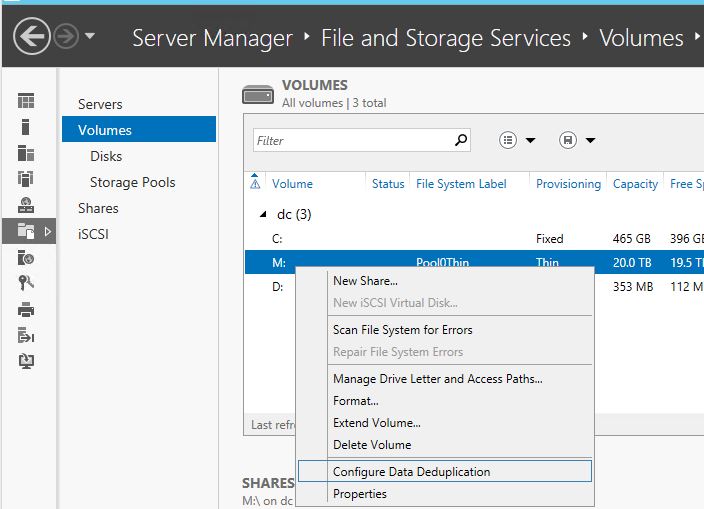
or, via PowerShell:
"Enable-DedupVolume M:"
In the next post I will get into the details of Storage Pools. This is a really neat feature of Windows 8 and 2012 that puts the old RAID system to shame.
Tuesday, September 10, 2013

Ch-ch-ch-Changes...
There are going to be a few changes around here.
I realized that try as I might, I have not been sticking to the "Practical Tech Tips and Reviews for Everyday Users" in my tag line. In fact I don't think in the 8 years this blog has been going, I have ever written a review.
That tag line has limited what I feel is appropriate to post to this blog, which has meant that some things I might like to post never get posted for fear of scaring away the "Everyday Users" ...but then what I do post is often too technical for that demographic anyway. This week marks a change in the focus of this blog. From now on, I'm just dropping the tag line all together. I will make no assumptions about who my audience is, and will post things strictly according to what I think is interesting enough, or important enough to share.
I will still try not to just repeat what you can find elsewhere on the internet. Inevitably I will talk about subjects that are being talked about somewhere else, but weighing in heavily with my own views, opinions and experiences. Some times things might get more technical around here than you are used to seeing here, but other times I might just share fun stuff I've found.
I hope that most of my readers will stay, but I am not writing this strictly to entertain one group of people, but because I have some things I'd like to share, and I will share with whomever is still listening.
Visible changes in the immediate future will be limited to just the logo at the top of the screen will lose that tagline. Over time though, I expect the blog content on average will get more technical, but not overwhelmingly so for anyone who already considers themselves a techie or advanced user.
I realized that try as I might, I have not been sticking to the "Practical Tech Tips and Reviews for Everyday Users" in my tag line. In fact I don't think in the 8 years this blog has been going, I have ever written a review.
That tag line has limited what I feel is appropriate to post to this blog, which has meant that some things I might like to post never get posted for fear of scaring away the "Everyday Users" ...but then what I do post is often too technical for that demographic anyway. This week marks a change in the focus of this blog. From now on, I'm just dropping the tag line all together. I will make no assumptions about who my audience is, and will post things strictly according to what I think is interesting enough, or important enough to share.
I will still try not to just repeat what you can find elsewhere on the internet. Inevitably I will talk about subjects that are being talked about somewhere else, but weighing in heavily with my own views, opinions and experiences. Some times things might get more technical around here than you are used to seeing here, but other times I might just share fun stuff I've found.
I hope that most of my readers will stay, but I am not writing this strictly to entertain one group of people, but because I have some things I'd like to share, and I will share with whomever is still listening.
Visible changes in the immediate future will be limited to just the logo at the top of the screen will lose that tagline. Over time though, I expect the blog content on average will get more technical, but not overwhelmingly so for anyone who already considers themselves a techie or advanced user.
Friday, September 06, 2013
SysInternals
It's been a while since I last posted something truly a tech tip for everyday users.
This is not something ground breaking and way out in the realm of the really techie user. Every user who is even moderately techie ought to already know about this, but for the enthusiast home user or future IT pro who hasn't yet run across Sysinternals (formerly WinInternals) you are really missing out.
Sysinternals has long provided really useful free utility programs for Windows that run with a small footprint and don't leave a lot of mess behind them after they run. You don't normally have to "install" them, just run them.
BgInfo is a neat little tool that will post some useful details about your computer in the corner of the screen so that you have a quick reference for which version of Windows you are using, What CPU your computer has, how much memory, and other details a tech support agent might ask about.
Desktops allows you to organize your applications on up to four virtual desktops so you can quickly switch between groups of applications. Put your Excel spreadsheet and bank stuff on one virtual screen, and facebook and twitter on another...
If you are making presentations often, or have a visual impairment, ZoomIt is a screen zoom and annotation tool designed for technical presentations, but generally useful for anyoone who wants to zoom in on stuff once in a while.
If you have ever run defrag and wondered how to defragment those system files that defrag can't touch, well Contig is there for that purpose.
For the advanced users, some of these tools are particularly useful in troubleshooting problems or investigating security issues. For example, if you needed to know what process is making outgoing connections to a certain IP that you suspect is related to malware, TCPView might help you track down just what program on your computer is doing that. Process Monitor (which is a replacement for two legacy Sysinternals utilities, Filemon and Regmon) can help you track a program's every move.
Some of the tools, like the PS tools and AD tools will only be of interest to pros working in an office environment.
Here is a quick free video course for those interested in some of sysinternals' more advanced tools. (you need a Windows Live/Hotmail login to get there, but that's free too).
http://www.microsoftvirtualacademy.com/training-courses/utilizing-sysinternals-tools-for-it-pros
This is not something ground breaking and way out in the realm of the really techie user. Every user who is even moderately techie ought to already know about this, but for the enthusiast home user or future IT pro who hasn't yet run across Sysinternals (formerly WinInternals) you are really missing out.
Sysinternals has long provided really useful free utility programs for Windows that run with a small footprint and don't leave a lot of mess behind them after they run. You don't normally have to "install" them, just run them.
BgInfo is a neat little tool that will post some useful details about your computer in the corner of the screen so that you have a quick reference for which version of Windows you are using, What CPU your computer has, how much memory, and other details a tech support agent might ask about.
Desktops allows you to organize your applications on up to four virtual desktops so you can quickly switch between groups of applications. Put your Excel spreadsheet and bank stuff on one virtual screen, and facebook and twitter on another...
If you are making presentations often, or have a visual impairment, ZoomIt is a screen zoom and annotation tool designed for technical presentations, but generally useful for anyoone who wants to zoom in on stuff once in a while.
If you have ever run defrag and wondered how to defragment those system files that defrag can't touch, well Contig is there for that purpose.
For the advanced users, some of these tools are particularly useful in troubleshooting problems or investigating security issues. For example, if you needed to know what process is making outgoing connections to a certain IP that you suspect is related to malware, TCPView might help you track down just what program on your computer is doing that. Process Monitor (which is a replacement for two legacy Sysinternals utilities, Filemon and Regmon) can help you track a program's every move.
Some of the tools, like the PS tools and AD tools will only be of interest to pros working in an office environment.
Here is a quick free video course for those interested in some of sysinternals' more advanced tools. (you need a Windows Live/Hotmail login to get there, but that's free too).
http://www.microsoftvirtualacademy.com/training-courses/utilizing-sysinternals-tools-for-it-pros
Saturday, August 17, 2013
Finding The Culprit Of High Bandwidth Use
On Wednesday I was visiting my parents and Dad mentioned that over the last 2 months he'd been seeing some high bandwidth use on his home DSL. Typically in the past they'd never used more than 10-15GB/month because they don't use streaming video and the biggest bandwidth hog is probably uploading photos to Facebook. Lately it has had occasional days where the use has gone up to 5-7 GB in a day.
He had it narrowed down to one laptop because one of those days happened when they were not even home, but that laptop was still on.
Dad is a pretty techie guy, he worked for Honeywell computers out of college and then Bell Canada for a very long career specializing in large business PBX and 911 systems. He's never been afraid of computers. I think he'd rank highly on the MIT hacker test because he actually has programmed with punch cards.
Anyway, given that background this is what I've suggested to him:
Download and install Wireshark from http://www.wireshark.org/download.html
Once it is installed, open a CMD DOS prompt and change directory to C:\Program Files\Wireshark>
Run this command, and leave it running all day. It will record what servers on the internet (by IP addresses) you connected to and how much traffic was sent. This command also tells it to ignore traffic that is between two addresses that both start with 192.168... thus ignoring anything that is local to your house.
tshark.exe -i Wi-Fi -z conv,ip,ip dst net 192.168 and src net not 192.168 or ip dst net not 192.168 and src net 192.168 > C:\users\public\tshark.txt
Note: you may need to change the "-i Wi-Fi" part to "-i Local Area Connection*" or something else.
Use "tshark -D" to find the list of network interfaces on your computer.
It should print "Capturing on 'Wi-Fi'" then a counter. Meanwhile in the file C:\users\public\tshark.txt it is recording what servers you connect to, if you use CTRL-C to stop it, or just close the CMD window, it will end the file with a chart of what connections it saw and how many bytes were transferred.
example output:
3.708876 192.168.2.206 -> 65.54.81.79 TCP 74 [TCP Dup ACK 2393#21] 16378 > http [ACK] Seq=1 Ack=2076733 Win=1327 Len=0 SLE=2095609 SRE=2111581 SLE=2078185 SRE=2094157
3.709305 192.168.2.206 -> 65.54.81.79 TCP 74 [TCP Dup ACK 2393#22] 16378 > http [ACK] Seq=1 Ack=2076733 Win=1327 Len=0 SLE=2095609 SRE=2113033 SLE=2078185 SRE=2094157
3.710766 192.168.2.206 -> 65.54.81.79 TCP 54 16312 > http [ACK] Seq=1 Ack=1854205 Win=969 Len=0
3.712005 192.168.2.206 -> 65.54.81.79 TCP 54 16312 > http [ACK] Seq=1 Ack=1857109 Win=964 Len=0
3.712776 192.168.2.206 -> 65.54.81.79 TCP 74 [TCP Dup ACK 2393#23] 16378 > http [ACK] Seq=1 Ack=2076733 Win=1327 Len=0 SLE=2095609 SRE=2114485 SLE=2078185 SRE=2094157
================================================================================
IPv4 Conversations
Filter:ip
| <- -="" nbsp=""> | | Total | Relative | Duration |
| Frames Bytes | | Frames Bytes | | Frames Bytes | Start | |
192.168.2.206 <-> 65.54.81.79 0 0 2419 138406 2419 138406 0.000000000 3.7128
================================================================================
Edit: Included a screen capture because Blogger doesn't seem to have any fixed-width fonts.

He had it narrowed down to one laptop because one of those days happened when they were not even home, but that laptop was still on.
Dad is a pretty techie guy, he worked for Honeywell computers out of college and then Bell Canada for a very long career specializing in large business PBX and 911 systems. He's never been afraid of computers. I think he'd rank highly on the MIT hacker test because he actually has programmed with punch cards.
Anyway, given that background this is what I've suggested to him:
Download and install Wireshark from http://www.wireshark.org/download.html
Once it is installed, open a CMD DOS prompt and change directory to C:\Program Files\Wireshark>
Run this command, and leave it running all day. It will record what servers on the internet (by IP addresses) you connected to and how much traffic was sent. This command also tells it to ignore traffic that is between two addresses that both start with 192.168... thus ignoring anything that is local to your house.
tshark.exe -i Wi-Fi -z conv,ip,ip dst net 192.168 and src net not 192.168 or ip dst net not 192.168 and src net 192.168 > C:\users\public\tshark.txt
Note: you may need to change the "-i Wi-Fi" part to "-i Local Area Connection*" or something else.
Use "tshark -D" to find the list of network interfaces on your computer.
It should print "Capturing on 'Wi-Fi'" then a counter. Meanwhile in the file C:\users\public\tshark.txt it is recording what servers you connect to, if you use CTRL-C to stop it, or just close the CMD window, it will end the file with a chart of what connections it saw and how many bytes were transferred.
example output:
3.708876 192.168.2.206 -> 65.54.81.79 TCP 74 [TCP Dup ACK 2393#21] 16378 > http [ACK] Seq=1 Ack=2076733 Win=1327 Len=0 SLE=2095609 SRE=2111581 SLE=2078185 SRE=2094157
3.709305 192.168.2.206 -> 65.54.81.79 TCP 74 [TCP Dup ACK 2393#22] 16378 > http [ACK] Seq=1 Ack=2076733 Win=1327 Len=0 SLE=2095609 SRE=2113033 SLE=2078185 SRE=2094157
3.710766 192.168.2.206 -> 65.54.81.79 TCP 54 16312 > http [ACK] Seq=1 Ack=1854205 Win=969 Len=0
3.712005 192.168.2.206 -> 65.54.81.79 TCP 54 16312 > http [ACK] Seq=1 Ack=1857109 Win=964 Len=0
3.712776 192.168.2.206 -> 65.54.81.79 TCP 74 [TCP Dup ACK 2393#23] 16378 > http [ACK] Seq=1 Ack=2076733 Win=1327 Len=0 SLE=2095609 SRE=2114485 SLE=2078185 SRE=2094157
================================================================================
IPv4 Conversations
Filter:ip
| <- -="" nbsp=""> | | Total | Relative | Duration |
| Frames Bytes | | Frames Bytes | | Frames Bytes | Start | |
192.168.2.206 <-> 65.54.81.79 0 0 2419 138406 2419 138406 0.000000000 3.7128
================================================================================
Edit: Included a screen capture because Blogger doesn't seem to have any fixed-width fonts.

Subscribe to:
Posts (Atom)


