Showing posts with label network. Show all posts

Wednesday, September 11, 2013

Why You Want Your Next File Server To Be Win2012 - Dedup

In the teaser post I showed you this image. It is a little bit misleading. My 722GB of data actually occupies 483.72 GB of disk space.
To compress it down to less than 2gb would require a type of black magick even Microsoft isn't able to produce.


I am using Windows 2012 data deduplication, which is a new technology that saves disk space by looking at each block on the disk and if there are multiple blocks that are the same it only saves one copy. So, if you have several copies of the same file, even if they are a little bit different from each other, or if you have files with lots of repetition (like log files), it can save you lots of space.

Because I'm using Windows data deduplication, the size on disk only shows the size of the metadata. With PowerShell's Measure-DedupFileMetadata command I can get the actual space used.


Adding the SavedSpace shown with Get-DedupStatus to the DedupSize shown by Measure-DedupFileMetadata indeed does add up to 721.26... just short of the Size of 722.68GB reported by the Measure-DedupFileMetadata and 722GB reported by the GUI. Given a margin of error on that calculation to account for rounding, that seems right to me.

Ok, so it didn't shrink it down to 2GB like the teaser might have lead you to think, but shrinking 722GB down to 484 GB is pretty impressive still, that's about a 33% savings. With a volume size as large as this (yup that says 20TB, but it's not real, we'll get to that in a later post) NTFS can no longer do file compression (NTFS file compression is not possible on drives that have a larger cluster size than 4K), but the new data deduplication applied at the volume level makes decently efficient use of space.

By now you are probably starting to see why it's suddenly important to start learning about PowerShell, if you haven't already started. The Windows GUI will no longer be sufficient to properly administer newer versions of Windows. For the past several years it was necessary for Exchange Server admins to get the most out of that product, and for Server Core editions of Windows Server to be manageable at their own console, but now newer features like Disk Deduplication and Storage Pools, require it in order to get the most out of these features. Much like Linux and Cisco, Windows is headed to an age where those who understand it's command line will be able to do much more, and do it much more efficiently, than those who only learn it's graphical interface.


So how do you go about setting up deduplication?

For starters, you need a separate disk from your OS boot disk. (you can't dedup c:)

You can install it via the old fashioned GUI:
Go into Server Manager
Click "Manage"
Click "Add Roles and Features"
Work your way down to "Server Roles"
Under "File and Storage Services", enable "Data Deduplication"


or, just open PowerShell and type:
"Import-Module ServerManager"
"Add-WindowsFeature -name FS-Data-Deduplication"

Enable it on a volume via the GUI:

In the Server Manager, select "File and Storage Services", and then "Volumes".
Right click on a volume, and select "Configure Data Deduplication"
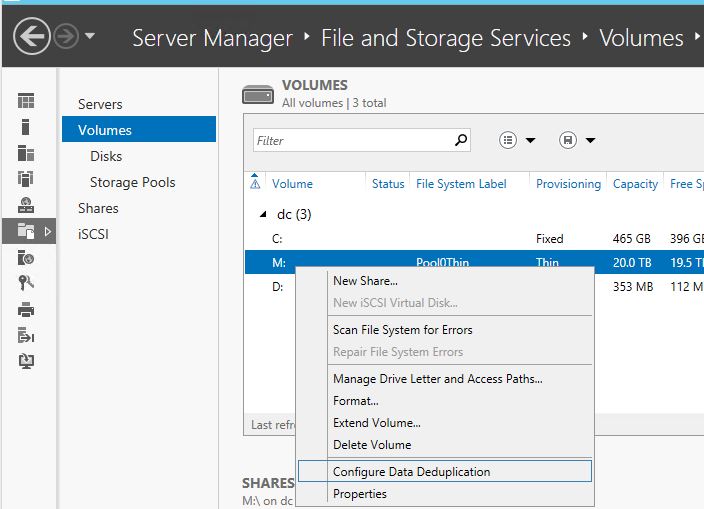


or, via PowerShell:
"Enable-DedupVolume M:"

In the next post I will get into the details of Storage Pools. This is a really neat feature of Windows 8 and 2012 that puts the old RAID system to shame.

Saturday, August 17, 2013

Finding The Culprit Of High Bandwidth Use

On Wednesday I was visiting my parents and Dad mentioned that over the last 2 months he'd been seeing some high bandwidth use on his home DSL. Typically in the past they'd never used more than 10-15GB/month because they don't use streaming video and the biggest bandwidth hog is probably uploading photos to Facebook. Lately it has had occasional days where the use has gone up to 5-7 GB in a day.

He had it narrowed down to one laptop because one of those days happened when they were not even home, but that laptop was still on.

Dad is a pretty techie guy, he worked for Honeywell computers out of college and then Bell Canada for a very long career specializing in large business PBX and 911 systems. He's never been afraid of computers. I think he'd rank highly on the MIT hacker test because he actually has programmed with punch cards.


Anyway, given that background this is what I've suggested to him:

Download and install Wireshark from http://www.wireshark.org/download.html
Once it is installed, open a CMD DOS prompt and change directory to C:\Program Files\Wireshark>

Run this command, and leave it running all day. It will record what servers on the internet (by IP addresses) you connected to and how much traffic was sent. This command also tells it to ignore traffic that is between two addresses that both start with 192.168...  thus ignoring anything that is local to your house.

tshark.exe -i Wi-Fi -z conv,ip,ip dst net 192.168 and src net not 192.168 or ip dst net not 192.168 and src net 192.168 > C:\users\public\tshark.txt

Note: you may need to change the "-i Wi-Fi" part to "-i Local Area Connection*" or something else.
Use "tshark -D" to find the list of network interfaces on your computer.

It should print "Capturing on 'Wi-Fi'" then a counter. Meanwhile in the file C:\users\public\tshark.txt it is recording what servers you connect to, if you use CTRL-C to stop it, or just close the CMD window, it will end the file with a chart of what connections it saw and how many bytes were transferred.

example output:
  3.708876 192.168.2.206 -> 65.54.81.79  TCP 74 [TCP Dup ACK 2393#21] 16378 > http [ACK] Seq=1 Ack=2076733 Win=1327 Len=0 SLE=2095609 SRE=2111581 SLE=2078185 SRE=2094157
  3.709305 192.168.2.206 -> 65.54.81.79  TCP 74 [TCP Dup ACK 2393#22] 16378 > http [ACK] Seq=1 Ack=2076733 Win=1327 Len=0 SLE=2095609 SRE=2113033 SLE=2078185 SRE=2094157
  3.710766 192.168.2.206 -> 65.54.81.79  TCP 54 16312 > http [ACK] Seq=1 Ack=1854205 Win=969 Len=0
  3.712005 192.168.2.206 -> 65.54.81.79  TCP 54 16312 > http [ACK] Seq=1 Ack=1857109 Win=964 Len=0
  3.712776 192.168.2.206 -> 65.54.81.79  TCP 74 [TCP Dup ACK 2393#23] 16378 > http [ACK] Seq=1 Ack=2076733 Win=1327 Len=0 SLE=2095609 SRE=2114485 SLE=2078185 SRE=2094157
================================================================================
IPv4 Conversations
Filter:ip
                                               |       <- -="" nbsp="">      | |     Total     |    Relative    |   Duration   |
                                               | Frames  Bytes | | Frames  Bytes | | Frames  Bytes |      Start     |              |
192.168.2.206        <-> 65.54.81.79                0         0    2419    138406    2419    138406     0.000000000         3.7128
================================================================================


Edit: Included a screen capture because Blogger doesn't seem to have any fixed-width fonts.